Procesamiento de documentos de atención médica con Mistral OCR 3
El sector de la salud genera el 30% de los datos mundiales, pero gran parte de ellos permanece inaccesible en PDF, faxes escaneados y documentos no estructurados. A medida que regulaciones como el mandato de autorización previa de CMS impulsan operaciones que priorizan lo digital y la escasez de personal hospitalario se intensifica, el procesamiento automatizado de documentos se ha convertido en una infraestructura crítica, no solo para la admisión de pacientes, sino también para operaciones administrativas como la gestión de facturas, la facturación y codificación médica, y la documentación clínica a escala.
Desafíos clave que impulsan la adopción de Document AI:
- El 30% de los datos globales se originan en el sector de la salud, en su mayoría no estructurados
- Los sistemas heredados dependen de papel, fax y formatos no digitales
- Presión regulatoria (mandatos de CMS, requisitos de interoperabilidad)
- Grave escasez de personal en roles clínicos y administrativos
Mistral OCR 3 maneja documentos de atención médica complejos —notas manuscritas, tablas de laboratorio anidadas, casillas de verificación y formularios de varias páginas— con una precisión comparable a las soluciones comerciales a una fracción del costo. Este manual demuestra cómo empezar.
También puedes explorar Document AI de forma interactiva en AI Studio
1. Configuración
Primero, instalemos mistralai y descarguemos el documento.
%%capture
!pip install mistralai
Documento de muestra
Este manual utiliza patient-packet-completed.pdf, un paquete sintético de varias páginas para pacientes que contiene datos demográficos, signos vitales y notas clínicas.
%%capture
!wget https://raw.githubusercontent.com/mistralai/cookbook/refs/heads/main/mistral/ocr/hcls/patient-packet-completed.pdf
# Verify sample document exists
import os
# Path to your pdf (using local file)
pdf_path = "patient-packet-completed.pdf"
if os.path.exists(pdf_path):
print(f"✅ Found: {pdf_path}")
print(f" Size: {os.path.getsize(pdf_path) / 1024:.1f} KB")
else:
print(f"❌ File not found: {pdf_path}")
print(" Please ensure patient-packet-completed.pdf is in the working directory")
# List available sample files in the workspace
!ls -la *.pdf 2>/dev/null || echo "No PDF files found in current directory"✅ Found: patient-packet-completed.pdf
Size: 4517.9 KB
-rw-r--r-- 1 root root 4626348 Dec 18 15:15 patient-packet-completed.pdfCrear cliente
Necesitaremos configurar nuestro cliente. Puedes crear una clave de API en AI Studio.
# Initialize Mistral client with API key
import os
from mistralai.client import Mistral
from google.colab import userdata
import requests

api_key = userdata.get('MISTRAL_API_KEY') # Replace with your way to retrieve API key

if not api_key:
    print("⚠️  WARNING: No API key found!")
else:
    client = Mistral(api_key=api_key)
    print("✅ Mistral client initialized")
✅ Mistral client initialized2. Caso de uso: Procesamiento OCR de un paquete de expedientes médicos de pacientes
Esta sección muestra las capacidades de Mistral OCR 3 utilizando un paquete de paciente de 3 páginas. Usaremos cada página para destacar varias características:
| Página | Tipo de documento | Característica OCR |
|---|---|---|
| 1 | Formulario de admisión de paciente | Elementos de formulario - casillas de verificación, escritura a mano, representación unificada de Unicode |
| 2 | Hoja de flujo de signos vitales | Salida de tabla HTML - tablas complejas con rowspan/colspan |
| 3 | Radiografía de pie | Anotaciones de imagen - imágenes incrustadas con descripciones |
Nota: Los datos de muestra son sintéticos/anonimizados.
2.1 Configuración: Cargar y procesar documento
Primero, codifiquemos el PDF y ejecutemos OCR en el paquete completo. Luego exploraremos la salida de cada página.
import base64

def encode_pdf(pdf_path):
    """Encode the pdf to base64."""
    try:
        with open(pdf_path, "rb") as pdf_file:
            return base64.b64encode(pdf_file.read()).decode('utf-8')
    except FileNotFoundError:
        print(f"Error: The file {pdf_path} was not found.")
        return None
    except Exception as e:
        print(f"Error: {e}")
        return None
Procesa el documento completo y obtén la salida OCR:
import json

# Getting the base64 string
base64_pdf = encode_pdf(pdf_path)

# Call the OCR API
pdf_response = client.ocr.process(
    model="mistral-ocr-latest",
    document={
        "type": "document_url",
        "document_url": f"data:application/pdf;base64,{base64_pdf}"
    },
    include_image_base64=True,
    table_format="html" #Specify HTML format to render complex table formats
)

# Convert response to JSON format
response_dict = json.loads(pdf_response.model_dump_json())
print(json.dumps(response_dict, indent=4)[0:1000]) # check the first 1000 characters{
"pages": [
{
"index": 0,
"markdown": "Southern Cross Healthcare\n\nPatient Admission Form\n\nIMPORTANT: Please send this completed form to the hospital where you will have your procedure/surgery.\n\nPERSONAL AND ADMINISTRATION DETAILS\n\n[tbl-0.html](tbl-0.html)\n\nPAYMENT DETAILS\n\nHow will your procedure be paid for? Tick and complete as many as applies:\n\n\u2610 Health insurance\n\u2610 ACC\n\u2610 DHB\n\u2611 Paid personally\n\u2610 Other \u2026\u2026\u2026\u2026\u2026\u2026\u2026\u2026\u2026\u2026\n\nDetails of health insurance\n\u2610 Southern Cross Affiliated Provider contract\n\nName of Insurer: ___________________________\n\nInsurance Plan Name: ___________________________\n\nMembership No: ___________________________\n\nHave you obtained \u201cprior approval\u201d for payment? Yes \u2610 No \u2610\n\nApproval No: ___________________________\n\n(Provide your prior approval letter in advance)\n\nAdditional charges\n\nDepending on your heaEstilicemos la salida para una mejor comprensión
from IPython.display import display, HTML, Markdown
from mistralai.client.models import OCRResponse
from bs4 import BeautifulSoup
# CSS styling for tables (reusable constant)
TABLE_STYLE = """
<style>
table {
border-collapse: collapse;
width: 100%;
margin: 10px 0;
}
th, td {
border: 1px solid black;
padding: 8px;
text-align: left;
}
th {
background-color: #f2f2f2;
}
</style>
"""
def replace_images_in_markdown(markdown_str: str, images_dict: dict) -> str:
"""Replace image placeholders in markdown with base64-encoded images."""
for img_name, base64_str in images_dict.items():
markdown_str = markdown_str.replace(
f"", f"<img src='{base64_str}' style='max-width:100%;'/>"
)
return markdown_str
def display_page_with_tables(page_index: int, ocr_data: dict, pdf_response: OCRResponse):
"""
Display a page with styled HTML tables and embedded images.
Tables are inserted inline at their original positions.
Uses REST API response for tables, SDK response for images.
Args:
page_index: Index of the page to display (0-based)
ocr_data: JSON data from REST API response
pdf_response: OCRResponse object from SDK
"""
if page_index >= len(ocr_data["pages"]):
print(f"Page {page_index} not found")
return
page = ocr_data["pages"][page_index]
markdown = page["markdown"]
# Replace table placeholders with styled HTML tables (preserves order)
# This specifically handles the format [tbl-X.html](tbl-X.html) where X is the table index
if "tables" in page and page["tables"]:
for table in page["tables"]:
table_id = table.get("id", "")
if table_id:
# Replace the exact placeholder format from the OCR output
placeholder = f"[{table_id}]({table_id})"
styled_table = TABLE_STYLE + table["content"]
markdown = markdown.replace(placeholder, styled_table)
# Replace image placeholders with base64 from pdf_response
if page_index < len(pdf_response.pages):
for img in pdf_response.pages[page_index].images:
markdown = markdown.replace(
f"",
f"<img src='{img.image_base64}' style='max-width:100%;'/>"
)
# Display as HTML with whitespace preservation
display(HTML(f"<div style='white-space: pre-wrap;'>{markdown}</div>"))
def display_all_pages(ocr_data: dict, pdf_response: OCRResponse, pages=None):
"""
Display all pages with styled HTML tables and images.
Args:
ocr_data: JSON data from REST API response
pdf_response: OCRResponse object from SDK
pages: List of page indices to display (None for all pages)
"""
if pages is None:
pages = range(len(ocr_data["pages"]))
for i in pages:
# Print page separator with proper newline handling
print(f"\n{'='*60}")
print(f"📄 PAGE {ocr_data['pages'][i]['index'] + 1}")
print('='*60)
# Display the page content with proper whitespace preservation
display_page_with_tables(i, ocr_data, pdf_response)
# Add spacing between pages for better readability
print(f"\n{'\n'}")2.2 Elementos de formulario: Casillas de verificación y campos estructurados (Página 1)
La página 1 contiene un Formulario de admisión de paciente con casillas de verificación, escritura a mano y líneas para rellenar. Mistral OCR 3 utiliza una representación unificada de casillas de verificación Unicode (☐ sin marcar, ☑ marcada) para un análisis consistente.
# Display Page 1 - Form Elements
print("📄 PAGE 1: Patient Admission Form")
print("Notice: Checkboxes rendered as ☐ (unchecked) and ☑ (checked)\n")
display_page_with_tables(0, response_dict, pdf_response)
📄 PAGE 1: Patient Admission Form
Notice: Checkboxes rendered as ☐ (unchecked) and ☑ (checked)<IPython.core.display.HTML object>| Surname (family name): Thompson | Mr ☑ Mrs ☐ Ms ☐ Miss ☐ Mstr ☐ Dr ☐ |
| First name(s): Michael | Preferred name: Mike |
| Date of birth: 05, 12, 1998 | NHI: ZAA0067 |
| Gender: ☑ Male ☐ Female ☐ I identify my gender as | |
| Residential address: 124 Mapleview Dr, Springfield, IL 62629 | |
| Postal address: Same as above | |
| Email address: [email protected] | |
| Telephone: (Home) 555-361-1492 (Business) — (Mobile) — | |
| New Zealand resident: Yes ☐ No ☐ If No, complete the ‘Acknowledgement Form: Non-NZ resident’ (on our website). | |
| Which ethnic group do you belong to? Tick the box or boxes which apply to you. ☐ New Zealand European ☐ Māori ☐ Samoan ☐ Cook Island Māori ☐ Tongan ☐ Niuean ☐ Chinese ☐ Indian ☑ Other (such as Dutch, Japanese, Tokelauan) Please state: _________________ | |
| General Practitioner (Name): Daniel Park | Telephone: 555-246-8239 |
| Medical Centre: Springfield Hospital | |
| NEXT OF KIN/CONTACT PERSON | |
| Name: Sarah Thompson | Relationship to patient: Spouse |
| Address: — | |
| Telephone: (Home) 555-246-1234 (Business) — (Mobile) — | |
2.3 Salida de tabla HTML: Hoja de flujo de signos vitales (Página 2)
La página 2 contiene una Hoja de flujo de signos vitales con estructuras de tabla complejas. Mistral OCR 3 ofrece la opción de generar tablas como HTML con atributos rowspan y colspan adecuados, preservando la estructura original para una extracción de datos precisa.
# Display Page 2 - Vital Signs Flowsheet with HTML table
print("📄 PAGE 2: Vital Signs Flowsheet")
print("Notice: Tables output as HTML with rowspan/colspan preserved\n")
display_page_with_tables(1, response_dict, pdf_response)
📄 PAGE 2: Vital Signs Flowsheet
Notice: Tables output as HTML with rowspan/colspan preserved<IPython.core.display.HTML object>| Patient: Michael Thompson | Notes: Patient presents left foot pain after ladder fall. Suspected metatarsal fracture. | ||||||
| DOB: 05/12/1978 | |||||||
| M/F: M | |||||||
| Physician: Dr. Emily Carter | |||||||
| Date | Weight | Temp. | BP | Pulse | Pulse OX | Pain | Initials |
| 12/01/25 | 185 | 98.6 | 132/84 | 78 | 98 | 8 | EC |
2.4 Anotaciones de imagen: Radiografía (Página 3)
La página 3 contiene una imagen de radiografía. Mistral OCR 3 puede detectar, extraer y anotar imágenes dentro de documentos. La imagen se incrusta en la salida de markdown con codificación base64.
# Display Page 3 - X-ray Image
print("📄 PAGE 3: Foot X-ray")
print("Notice: Images are detected and embedded with base64 encoding\n")

page3 = pdf_response.pages[2]

# Show image metadata
print(f"Images detected on this page: {len(page3.images)}")
for img in page3.images:
    print(f"  - Image ID: {img.id}")
    print(f"    Dimensions: ({img.top_left_x}, {img.top_left_y}) to ({img.bottom_right_x}, {img.bottom_right_y})")

print("\n" + "="*60)
print("Rendered Output (with embedded X-ray image):")
print("="*60)

# Display page with images and tables
display_page_with_tables(2, response_dict, pdf_response)
📄 PAGE 3: Foot X-ray
Notice: Images are detected and embedded with base64 encoding
Images detected on this page: 1
- Image ID: img-0.jpeg
Dimensions: (219, 297) to (1065, 1474)
============================================================
Rendered Output (with embedded X-ray image):
============================================================<IPython.core.display.HTML object>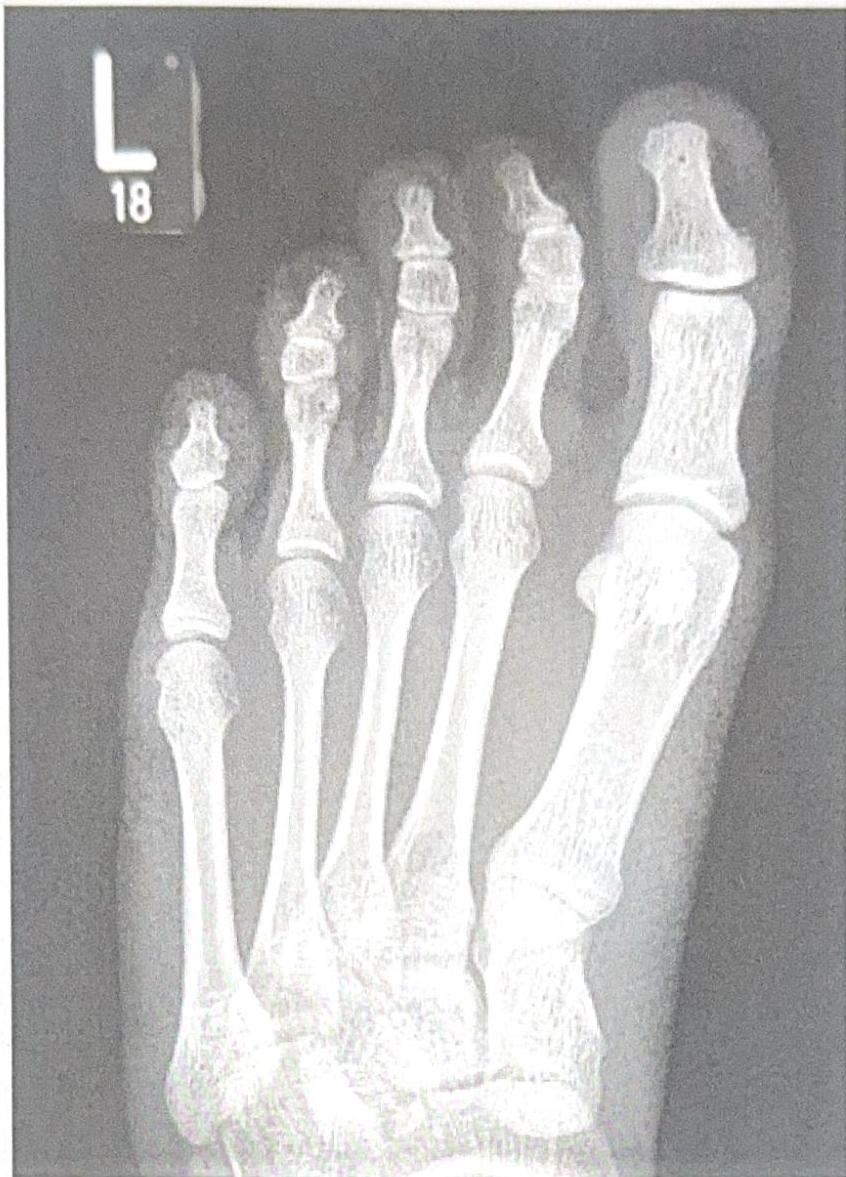
3. Inteligencia documental usando anotaciones
Pasar de los notebooks a la producción requiere patrones para la escala, la fiabilidad y la interoperabilidad. Esta sección demuestra un pipeline progresivo donde realizamos lo siguiente utilizando anotaciones de DocAI:
- Clasificación → Identificar tipos de documentos antes de la extracción
- Procesamiento por lotes → Manejar múltiples documentos concurrentemente
- Generación FHIR → Transformar datos extraídos a formatos estándar de atención médica
Nota: Consulta este manual para una introducción a las anotaciones.
Configuración de patrones de producción - importaciones y utilidades
import base64
import json
import time
import uuid
import os
from datetime import datetime
from enum import Enum
from typing import List, Dict, Any, Optional
from dataclasses import dataclass
from collections import Counter

from pydantic import BaseModel, Field, JsonValue
from mistralai.client import Mistral
from mistralai.extra import response_format_from_pydantic_model
from google.colab import userdata

api_key = userdata.get('MISTRAL_API_KEY') # Replace with your way to retrieve API key

if not api_key:
    print("⚠️  WARNING: No API key found!")
    print("   Set MISTRAL_API_KEY environment variable, or")
    print("   Uncomment and set api_key directly above")
else:
    client = Mistral(api_key=api_key)
    print("✅ Mistral client initialized")

def encode_pdf(pdf_path: str) -> Optional[str]:
    """Encode a PDF file to base64 string."""
    try:
        with open(pdf_path, "rb") as pdf_file:
            return base64.b64encode(pdf_file.read()).decode('utf-8')
    except FileNotFoundError:
        print(f"Error: The file {pdf_path} was not found.")
        return None
    except Exception as e:
        print(f"Error: {e}")
        return None

print("✅ Production patterns setup complete")
✅ Mistral client initialized
✅ Production patterns setup complete3.1 Clasificación de documentos y enrutamiento inteligente
Las organizaciones de atención médica reciben diariamente tipos de documentos mixtos: faxes, formularios escaneados, PDF digitales. Antes de la extracción, clasifica los documentos entrantes para determinar:
- Tipo de documento (datos demográficos, signos vitales, resultados de laboratorio, notas de progreso)
- Destino de enrutamiento (facturación, clínica, farmacia)
- Urgencia de procesamiento (urgente vs. rutinario)
Esta información luego informará qué esquema de extracción aplicar en la siguiente sección.
# Define classification schema for healthcare documents

# Possible values for incoming documents
class HealthcareDocumentType(str, Enum):
    PATIENT_DEMOGRAPHICS = "patient_demographics"
    PROGRESS_NOTES = "progress_notes"
    VITALS_FLOWSHEET = "vitals_flowsheet"
    LAB_RESULTS = "lab_results"
    MEDICATION_LIST = "medication_list"
    PRIOR_AUTHORIZATION = "prior_authorization"
    INSURANCE_CARD = "insurance_card"
    CONSENT_FORM = "consent_form"
    UNKNOWN = "unknown"

# Possible values for departments to route to
class RoutingDepartment(str, Enum):
    CLINICAL = "clinical"
    BILLING = "billing"
    PHARMACY = "pharmacy"
    RECORDS = "medical_records"
    INTAKE = "patient_intake"

# Classification schema
class DocumentClassification(BaseModel):
    document_type: HealthcareDocumentType = Field(..., description="The primary type of healthcare document")
    confidence: float = Field(..., description="Confidence score between 0.0 and 1.0")
    routing_department: RoutingDepartment = Field(..., description="Department that should handle this document")
    urgency: str = Field(..., description="Processing priority: 'stat', 'urgent', or 'routine'")
    key_identifiers_found: List[str] = Field(default=[], description="Patient identifiers detected (e.g., 'MRN', 'DOB', 'Name')")
    requires_signature: bool = Field(default=False, description="Whether document requires/contains signatures")
    summary: str = Field(..., description="One-sentence summary of document contents")
# Classify the patient packet document
base64_packet = encode_pdf(pdf_path)
# First-pass classification using only page 1
classification_response = client.ocr.process(
model="mistral-ocr-latest",
document={
"type": "document_url",
"document_url": f"data:application/pdf;base64,{base64_packet}"
},
pages=list(range(8)), # Document Annotations has a limit of 8 pages, we recommend spliting your documents when using it; bbox annotations does not have the same limit
document_annotation_format=response_format_from_pydantic_model(DocumentClassification),
include_image_base64=False
)
# Parse and display classification
classification = json.loads(classification_response.document_annotation)
print("📋 Document Classification Results")
print("=" * 50)
print(f"Type: {classification['document_type']}")
print(f"Confidence: {classification['confidence']:.0%}")
print(f"Route to: {classification['routing_department']}")
print(f"Urgency: {classification['urgency']}")
print(f"Identifiers: {', '.join(classification['key_identifiers_found'])}")
print(f"Signature: {'Yes' if classification['requires_signature'] else 'No'}")
print(f"\nSummary: {classification['summary']}")📋 Document Classification Results
==================================================
Type: patient_demographics
Confidence: 95%
Route to: patient_intake
Urgency: routine
Identifiers: Name: Michael Thompson, Date of Birth: 05/12/1978, NHI: 7AA0067, Address: 124 Mapleview Dr, Springfield, IL 62629, Email: [email protected], Phone: 555-361-1492, General Practitioner: Daniel Park, Medical Centre: Springfield Hospital, Next of Kin: Sarah Thompson, Phone: 555-246-1234
Signature: Yes
Summary: Patient admission form for Michael Thompson, including personal details, contact information, and next of kin.3.2 Extracción de esquemas basada en clasificación
Basándonos en la clasificación definida en el paso anterior, extraeremos diferentes elementos de datos de cada documento clasificado.
# Define type-specific extraction schemas for each document type

class PatientDemographics(BaseModel):
    """Schema for patient demographics and intake forms."""
    patient_name: str = Field(..., description="Full patient name")
    date_of_birth: str = Field(..., description="DOB in MM/DD/YYYY format")
    gender: Optional[str] = Field(None, description="Patient gender")
    address: Optional[str] = Field(None, description="Patient address")
    phone: Optional[str] = Field(None, description="Contact phone number")
    insurance_id: Optional[str] = Field(None, description="Insurance member ID")
    emergency_contact: Optional[str] = Field(None, description="Emergency contact info")

class VitalsFlowsheet(BaseModel):
    """Schema for vital signs flowsheets."""
    date_recorded: str = Field(..., description="Date vitals were recorded")
    blood_pressure: Optional[str] = Field(None, description="Blood pressure reading (systolic/diastolic)")
    heart_rate: Optional[str] = Field(None, description="Heart rate in BPM")
    temperature: Optional[str] = Field(None, description="Body temperature")
    respiratory_rate: Optional[str] = Field(None, description="Respiratory rate")
    oxygen_saturation: Optional[str] = Field(None, description="SpO2 percentage")
    weight: Optional[str] = Field(None, description="Patient weight")
    height: Optional[str] = Field(None, description="Patient height")

# Map document types to their extraction schemas
EXTRACTION_SCHEMAS: Dict[str, type] = {
    "patient_demographics": PatientDemographics,
    "vitals_flowsheet": VitalsFlowsheet,
    # Add more mappings as needed
}

print("✅ Defined extraction schemas for:", list(EXTRACTION_SCHEMAS.keys()))
✅ Defined extraction schemas for: ['patient_demographics', 'vitals_flowsheet']3.3 Combinar clasificación y extracción con procesamiento por lotes
Los sistemas de producción procesan cientos de documentos diariamente. Este patrón extiende la clasificación y extracción para manejar paquetes de varias páginas donde cada página puede ser un tipo de documento diferente (datos demográficos, signos vitales, resultados de laboratorio, etc.).
@dataclass
class PageResult:
    """Result container for a single processed page"""
    page_index: int
    document_type: str
    classification: Dict[str, Any]
    extracted_data: Optional[Dict[str, Any]]
    markdown_content: str
    status: str  # "success", "error", "skipped"
    error_message: Optional[str] = None
    processing_time_ms: float = 0

def process_patient_packet(pdf_path: str, rate_limit_delay: float = 0.5) -> List[PageResult]:
    """
    Process a multi-page patient packet with per-page classification and extraction.

    Args:
        pdf_path: Path to the PDF file
        rate_limit_delay: Delay between API calls to respect rate limits

    Returns:
        List of PageResult objects with classification and extracted data
    """
    base64_pdf = encode_pdf(pdf_path)
    results = []

    # First, get the full document to know page count
    full_response = client.ocr.process(
        model="mistral-ocr-latest",
        document={
            "type": "document_url",
            "document_url": f"data:application/pdf;base64,{base64_pdf}"
        },
        include_image_base64=False
    )

    num_pages = len(full_response.pages)
    print(f"📄 Processing {num_pages} pages from {pdf_path}")
    print("-" * 50)

    for page_idx in range(num_pages):
        start_time = time.time()

        try:
            # Step 1: Classify this page
            time.sleep(rate_limit_delay)  # Rate limiting

            classify_response = client.ocr.process(
                model="mistral-ocr-latest",
                document={
                    "type": "document_url",
                    "document_url": f"data:application/pdf;base64,{base64_pdf}"
                },
                pages=[page_idx],
                document_annotation_format=response_format_from_pydantic_model(DocumentClassification),
                include_image_base64=False
            )

            page_classification = json.loads(classify_response.document_annotation)
            doc_type = page_classification["document_type"]

            # Step 2: Extract with type-specific schema if available
            extracted_data = None
            if doc_type in EXTRACTION_SCHEMAS:
                time.sleep(rate_limit_delay)

                extract_response = client.ocr.process(
                    model="mistral-ocr-latest",
                    document={
                        "type": "document_url",
                        "document_url": f"data:application/pdf;base64,{base64_pdf}"
                    },
                    pages=[page_idx],
                    document_annotation_format=response_format_from_pydantic_model(EXTRACTION_SCHEMAS[doc_type]),
                    include_image_base64=False
                )
                extracted_data = json.loads(extract_response.document_annotation)

            processing_time = (time.time() - start_time) * 1000

            result = PageResult(
                page_index=page_idx,
                document_type=doc_type,
                classification=page_classification,
                extracted_data=extracted_data,
                markdown_content=full_response.pages[page_idx].markdown,
                status="success",
                processing_time_ms=processing_time
            )

            print(f"  ✅ Page {page_idx + 1}: {doc_type} ({processing_time:.0f}ms)")

        except Exception as e:
            result = PageResult(
                page_index=page_idx,
                document_type="unknown",
                classification={},
                extracted_data=None,
                markdown_content="",
                status="error",
                error_message=str(e),
                processing_time_ms=(time.time() - start_time) * 1000
            )
            print(f"  ❌ Page {page_idx + 1}: Error - {str(e)[:50]}")

        results.append(result)

    return results

# Process the patient packet
batch_results = process_patient_packet("patient-packet-completed.pdf")

# Summary statistics
print("\n" + "=" * 50)
print("📊 BATCH PROCESSING SUMMARY")
print("=" * 50)
successful = [r for r in batch_results if r.status == "success"]
failed = [r for r in batch_results if r.status == "error"]

print(f"Total pages:     {len(batch_results)}")
print(f"Successful:      {len(successful)}")
print(f"Failed:          {len(failed)}")
print(f"Total time:      {sum(r.processing_time_ms for r in batch_results):.0f}ms")

# Group by document type
doc_types = Counter(r.document_type for r in successful)
print(f"\nDocument types found:")
for doc_type, count in doc_types.items():
    print(f"  • {doc_type}: {count} page(s)")

# Display extracted data for each page
print("📋 EXTRACTED DATA BY PAGE")
print("=" * 50)

for result in batch_results:
    if result.status == "success":
        print(f"\n🔹 Page {result.page_index + 1}: {result.document_type}")
        print(f"   Confidence: {result.classification.get('confidence', 'N/A'):.0%}")
        print(f"   Route to: {result.classification.get('routing_department', 'N/A')}")

        if result.extracted_data:
            print("   Extracted fields:")
            for key, value in result.extracted_data.items():
                if value:  # Only show non-null values
                    print(f"     • {key}: {value}")
📄 Processing 3 pages from patient-packet-completed.pdf
--------------------------------------------------
✅ Page 1: patient_demographics (12119ms)
✅ Page 2: vitals_flowsheet (10534ms)
✅ Page 3: lab_results (4958ms)
==================================================
📊 BATCH PROCESSING SUMMARY
==================================================
Total pages: 3
Successful: 3
Failed: 0
Total time: 27611ms
Document types found:
• patient_demographics: 1 page(s)
• vitals_flowsheet: 1 page(s)
• lab_results: 1 page(s)
📋 EXTRACTED DATA BY PAGE
==================================================
🔹 Page 1: patient_demographics
Confidence: 95%
Route to: patient_intake
Extracted fields:
• patient_name: Michael Thompson
• date_of_birth: 05/12/1998
• gender: Male
• address: 124 Mapleview Dr, Springfield, IL 62629
• phone: 555-361-1492
• emergency_contact: Sarah Thompson, Spouse, 555-246-1234
🔹 Page 2: vitals_flowsheet
Confidence: 95%
Route to: clinical
Extracted fields:
• date_recorded: 12/01/25
• blood_pressure: 132/84
• heart_rate: 78
• temperature: 98.6
• oxygen_saturation: 98
• weight: 185
🔹 Page 3: lab_results
Confidence: 92%
Route to: clinical3.4 Generación de recursos FHIR
Los datos extraídos solo son valiosos si se integran con los sistemas clínicos. FHIR (Fast Healthcare Interoperability Resources) es el estándar de la industria para el intercambio de datos de atención médica, compatible con Epic, Cerner y todos los principales EHR.
Este patrón transforma nuestros datos extraídos por lotes en recursos FHIR R4:
- Paciente → Datos demográficos de los formularios de admisión
- Observación → Mediciones de signos vitales
El paquete FHIR resultante se puede enviar (POST) a cualquier sistema compatible con FHIR.
# FHIR R4 Resource Generation from extracted OCR data

def generate_fhir_patient(demographics: Dict[str, Any]) -> Dict[str, Any]:
    """Convert extracted demographics to FHIR R4 Patient resource"""
    # Parse name (assumes "Last, First" or "First Last" format)
    name_parts = demographics.get("patient_name", "Unknown").replace(",", " ").split()

    patient = {
        "resourceType": "Patient",
        "id": str(uuid.uuid4()),
        "meta": {
            "profile": ["http://hl7.org/fhir/us/core/StructureDefinition/us-core-patient"]
        },
        "identifier": [{
            "system": "urn:oid:2.16.840.1.113883.4.1",  # Example OID
            "value": demographics.get("insurance_id", "UNKNOWN")
        }],
        "name": [{
            "use": "official",
            "family": name_parts[0] if name_parts else "Unknown",
            "given": name_parts[1:] if len(name_parts) > 1 else []
        }],
        "birthDate": convert_date_to_fhir(demographics.get("date_of_birth")),
        "gender": map_gender(demographics.get("gender")),
    }

    # Add address if present
    if demographics.get("address"):
        patient["address"] = [{
            "use": "home",
            "text": demographics["address"]
        }]

    # Add phone if present
    if demographics.get("phone"):
        patient["telecom"] = [{
            "system": "phone",
            "value": demographics["phone"],
            "use": "home"
        }]

    return patient

def generate_fhir_vitals(vitals: Dict[str, Any], patient_id: str) -> List[Dict[str, Any]]:
    """Convert extracted vitals to FHIR R4 Observation resources"""
    observations = []

    # LOINC codes for common vitals
    vital_mappings = {
        "blood_pressure": {"code": "85354-9", "display": "Blood pressure panel"},
        "heart_rate": {"code": "8867-4", "display": "Heart rate", "unit": "/min"},
        "temperature": {"code": "8310-5", "display": "Body temperature", "unit": "Cel"},
        "respiratory_rate": {"code": "9279-1", "display": "Respiratory rate", "unit": "/min"},
        "oxygen_saturation": {"code": "2708-6", "display": "Oxygen saturation", "unit": "%"},
        "weight": {"code": "29463-7", "display": "Body weight", "unit": "kg"},
        "height": {"code": "8302-2", "display": "Body height", "unit": "cm"}
    }

    effective_date = convert_date_to_fhir(vitals.get("date_recorded")) or datetime.now().strftime("%Y-%m-%d")

    for vital_key, loinc in vital_mappings.items():
        value = vitals.get(vital_key)
        if value:
            observation = {
                "resourceType": "Observation",
                "id": str(uuid.uuid4()),
                "status": "final",
                "category": [{
                    "coding": [{
                        "system": "http://terminology.hl7.org/CodeSystem/observation-category",
                        "code": "vital-signs",
                        "display": "Vital Signs"
                    }]
                }],
                "code": {
                    "coding": [{
                        "system": "http://loinc.org",
                        "code": loinc["code"],
                        "display": loinc["display"]
                    }]
                },
                "subject": {"reference": f"Patient/{patient_id}"},
                "effectiveDateTime": effective_date,
                "valueString": str(value)  # Using string for flexibility; production would parse numeric
            }
            observations.append(observation)

    return observations

# Helper functions
def convert_date_to_fhir(date_str: Optional[str]) -> Optional[str]:
    """Convert various date formats to FHIR format (YYYY-MM-DD)"""
    if not date_str:
        return None
    # Handle MM/DD/YYYY format
    try:
        parts = date_str.replace("-", "/").split("/")
        if len(parts) == 3:
            if len(parts[0]) == 4:  # Already YYYY-MM-DD
                return date_str
            return f"{parts[2]}-{parts[0].zfill(2)}-{parts[1].zfill(2)}"
    except:
        pass
    return date_str

def map_gender(gender_str: Optional[str]) -> str:
    """Map various gender representations to FHIR values"""
    if not gender_str:
        return "unknown"
    g = gender_str.lower().strip()
    if g in ["m", "male"]:
        return "male"
    elif g in ["f", "female"]:
        return "female"
    return "unknown"

print("✅ FHIR resource generators ready")
✅ FHIR resource generators readydef create_fhir_bundle_from_batch(batch_results: List[PageResult]) -> Dict[str, Any]:
"""
Create a FHIR Bundle from batch-processed OCR results.
Args:
batch_results: Results from process_patient_packet()
Returns:
FHIR R4 Bundle resource ready for EHR integration
"""
bundle = {
"resourceType": "Bundle",
"id": str(uuid.uuid4()),
"type": "transaction",
"timestamp": datetime.now().isoformat(),
"entry": []
}
patient_id = None
for result in batch_results:
if result.status != "success" or not result.extracted_data:
continue
doc_type = result.document_type
data = result.extracted_data
# Generate Patient resource from demographics
if doc_type == "patient_demographics":
patient_resource = generate_fhir_patient(data)
patient_id = patient_resource["id"]
bundle["entry"].append({
"fullUrl": f"urn:uuid:{patient_id}",
"resource": patient_resource,
"request": {
"method": "POST",
"url": "Patient"
}
})
# Generate Observations from vitals
elif doc_type == "vitals_flowsheet" and patient_id:
observations = generate_fhir_vitals(data, patient_id)
for obs in observations:
bundle["entry"].append({
"fullUrl": f"urn:uuid:{obs['id']}",
"resource": obs,
"request": {
"method": "POST",
"url": "Observation"
}
})
return bundle
# Generate FHIR Bundle from our batch results
fhir_bundle = create_fhir_bundle_from_batch(batch_results)
print("🏥 FHIR BUNDLE GENERATED")
print("=" * 50)
print(f"Bundle ID: {fhir_bundle['id']}")
print(f"Bundle Type: {fhir_bundle['type']}")
print(f"Total Resources: {len(fhir_bundle['entry'])}")
print(f"\nResources by type:")
resource_types = Counter(e["resource"]["resourceType"] for e in fhir_bundle["entry"])
for rtype, count in resource_types.items():
print(f" • {rtype}: {count}")
# Display the full FHIR Bundle (ready to POST to an EHR)
print("📄 FHIR BUNDLE JSON (Ready for EHR Integration)")
print("=" * 50)
print(json.dumps(fhir_bundle, indent=2))🏥 FHIR BUNDLE GENERATED
==================================================
Bundle ID: dd0f9bd6-e9f0-4878-96f3-e15f055d71a3
Bundle Type: transaction
Total Resources: 6
Resources by type:
• Patient: 1
• Observation: 5
📄 FHIR BUNDLE JSON (Ready for EHR Integration)
==================================================
{
"resourceType": "Bundle",
"id": "dd0f9bd6-e9f0-4878-96f3-e15f055d71a3",
"type": "transaction",
"timestamp": "2025-12-18T15:42:47.872758",
"entry": [
{
"fullUrl": "urn:uuid:835ae85c-fb61-4145-b270-1ecafe715df1",
"resource": {
"resourceType": "Patient",
"id": "835ae85c-fb61-4145-b270-1ecafe715df1",
"meta": {
"profile": [
"http://hl7.org/fhir/us/core/StructureDefinition/us-core-patient"
]
},
"identifier": [
{
"system": "urn:oid:2.16.840.1.113883.4.1",
"value": null
}
],
"name": [
{
"use": "official",
"family": "Michael",
"given": [
"Thompson"
]
}
],
"birthDate": "1998-05-12",
"gender": "male",
"address": [
{
"use": "home",
"text": "124 Mapleview Dr, Springfield, IL 62629"
}
],
"telecom": [
{
"system": "phone",
"value": "555-361-1492",
"use": "home"
}
]
},
"request": {
"method": "POST",
"url": "Patient"
}
},
{
"fullUrl": "urn:uuid:c6683d4e-4990-4d5e-82d6-1f1f24115ca5",
"resource": {
"resourceType": "Observation",
"id": "c6683d4e-4990-4d5e-82d6-1f1f24115ca5",
"status": "final",
"category": [
{
"coding": [
{
"system": "http://terminology.hl7.org/CodeSystem/observation-category",
"code": "vital-signs",
"display": "Vital Signs"
}
]
}
],
"code": {
"coding": [
{
"system": "http://loinc.org",
"code": "85354-9",
"display": "Blood pressure panel"
}
]
},
"subject": {
"reference": "Patient/835ae85c-fb61-4145-b270-1ecafe715df1"
},
"effectiveDateTime": "25-12-01",
"valueString": "132/84"
},
"request": {
"method": "POST",
"url": "Observation"
}
},
{
"fullUrl": "urn:uuid:b42b54e2-1346-471a-85e8-1405835ebcf6",
"resource": {
"resourceType": "Observation",
"id": "b42b54e2-1346-471a-85e8-1405835ebcf6",
"status": "final",
"category": [
{
"coding": [
{
"system": "http://terminology.hl7.org/CodeSystem/observation-category",
"code": "vital-signs",
"display": "Vital Signs"
}
]
}
],
"code": {
"coding": [
{
"system": "http://loinc.org",
"code": "8867-4",
"display": "Heart rate"
}
]
},
"subject": {
"reference": "Patient/835ae85c-fb61-4145-b270-1ecafe715df1"
},
"effectiveDateTime": "25-12-01",
"valueString": "78"
},
"request": {
"method": "POST",
"url": "Observation"
}
},
{
"fullUrl": "urn:uuid:1b6b492d-5683-4829-9dba-9063d8324f42",
"resource": {
"resourceType": "Observation",
"id": "1b6b492d-5683-4829-9dba-9063d8324f42",
"status": "final",
"category": [
{
"coding": [
{
"system": "http://terminology.hl7.org/CodeSystem/observation-category",
"code": "vital-signs",
"display": "Vital Signs"
}
]
}
],
"code": {
"coding": [
{
"system": "http://loinc.org",
"code": "8310-5",
"display": "Body temperature"
}
]
},
"subject": {
"reference": "Patient/835ae85c-fb61-4145-b270-1ecafe715df1"
},
"effectiveDateTime": "25-12-01",
"valueString": "98.6"
},
"request": {
"method": "POST",
"url": "Observation"
}
},
{
"fullUrl": "urn:uuid:f01f9922-c631-461b-be34-2fc6961bd7fc",
"resource": {
"resourceType": "Observation",
"id": "f01f9922-c631-461b-be34-2fc6961bd7fc",
"status": "final",
"category": [
{
"coding": [
{
"system": "http://terminology.hl7.org/CodeSystem/observation-category",
"code": "vital-signs",
"display": "Vital Signs"
}
]
}
],
"code": {
"coding": [
{
"system": "http://loinc.org",
"code": "2708-6",
"display": "Oxygen saturation"
}
]
},
"subject": {
"reference": "Patient/835ae85c-fb61-4145-b270-1ecafe715df1"
},
"effectiveDateTime": "25-12-01",
"valueString": "98"
},
"request": {
"method": "POST",
"url": "Observation"
}
},
{
"fullUrl": "urn:uuid:64d3c964-9b51-4913-b542-65d47a5e49d5",
"resource": {
"resourceType": "Observation",
"id": "64d3c964-9b51-4913-b542-65d47a5e49d5",
"status": "final",
"category": [
{
"coding": [
{
"system": "http://terminology.hl7.org/CodeSystem/observation-category",
"code": "vital-signs",
"display": "Vital Signs"
}
]
}
],
"code": {
"coding": [
{
"system": "http://loinc.org",
"code": "29463-7",
"display": "Body weight"
}
]
},
"subject": {
"reference": "Patient/835ae85c-fb61-4145-b270-1ecafe715df1"
},
"effectiveDateTime": "25-12-01",
"valueString": "185"
},
"request": {
"method": "POST",
"url": "Observation"
}
}
]
}4. Resumen y próximos pasos
Este manual demostró un pipeline de producción completo para OCR en el sector de la salud:
| Patrón | Propósito | Beneficio clave |
|---|---|---|
| Clasificación | Identificar tipos de documentos | Enrutar al esquema de extracción correcto |
| Procesamiento por lotes | Manejar paquetes de varias páginas | Escalar con limitación de velocidad y aislamiento de errores |
| Generación FHIR | Convertir a estándares de atención médica | Integrar con Epic, Cerner, cualquier EHR FHIR |
Mejoras de producción a considerar:
- Umbrales de confianza → Marcar extracciones de baja confianza para revisión humana
- Procesamiento asíncrono → Usar
asynciopara un mayor rendimiento - Registro de auditoría → Rastrear el acceso a PHI para el cumplimiento de HIPAA
- Validación FHIR → Validar paquetes contra perfiles US Core antes del envío
- Notificaciones de webhook → Alertar a los sistemas posteriores cuando el procesamiento se complete