Lección 55 · 5 min · Gratis
Extracción de información de recibos con la API por lotes de Mistral
En este notebook, te guiaremos a través de un ejemplo de cómo extraer información de múltiples recibos usando la API por lotes de Mistral y devolver los datos en un DataFrame de pandas.
!pip install mistralai datasetsCollecting mistralai
Downloading mistralai-1.2.3-py3-none-any.whl.metadata (26 kB)
Collecting datasets
Downloading datasets-3.1.0-py3-none-any.whl.metadata (20 kB)
Requirement already satisfied: eval-type-backport<0.3.0,>=0.2.0 in /usr/local/lib/python3.10/dist-packages (from mistralai) (0.2.0)
Requirement already satisfied: httpx<0.28.0,>=0.27.0 in /usr/local/lib/python3.10/dist-packages (from mistralai) (0.27.2)
Collecting jsonpath-python<2.0.0,>=1.0.6 (from mistralai)
Downloading jsonpath_python-1.0.6-py3-none-any.whl.metadata (12 kB)
Requirement already satisfied: pydantic<3.0.0,>=2.9.0 in /usr/local/lib/python3.10/dist-packages (from mistralai) (2.9.2)
Requirement already satisfied: python-dateutil==2.8.2 in /usr/local/lib/python3.10/dist-packages (from mistralai) (2.8.2)
Collecting typing-inspect<0.10.0,>=0.9.0 (from mistralai)
Downloading typing_inspect-0.9.0-py3-none-any.whl.metadata (1.5 kB)
Requirement already satisfied: six>=1.5 in /usr/local/lib/python3.10/dist-packages (from python-dateutil==2.8.2->mistralai) (1.16.0)
Requirement already satisfied: filelock in /usr/local/lib/python3.10/dist-packages (from datasets) (3.16.1)
Requirement already satisfied: numpy>=1.17 in /usr/local/lib/python3.10/dist-packages (from datasets) (1.26.4)
Requirement already satisfied: pyarrow>=15.0.0 in /usr/local/lib/python3.10/dist-packages (from datasets) (17.0.0)
Collecting dill<0.3.9,>=0.3.0 (from datasets)
Downloading dill-0.3.8-py3-none-any.whl.metadata (10 kB)
Requirement already satisfied: pandas in /usr/local/lib/python3.10/dist-packages (from datasets) (2.2.2)
Requirement already satisfied: requests>=2.32.2 in /usr/local/lib/python3.10/dist-packages (from datasets) (2.32.3)
Requirement already satisfied: tqdm>=4.66.3 in /usr/local/lib/python3.10/dist-packages (from datasets) (4.66.6)
Collecting xxhash (from datasets)
Downloading xxhash-3.5.0-cp310-cp310-manylinux_2_17_x86_64.manylinux2014_x86_64.whl.metadata (12 kB)
Collecting multiprocess<0.70.17 (from datasets)
Downloading multiprocess-0.70.16-py310-none-any.whl.metadata (7.2 kB)
Collecting fsspec<=2024.9.0,>=2023.1.0 (from fsspec[http]<=2024.9.0,>=2023.1.0->datasets)
Downloading fsspec-2024.9.0-py3-none-any.whl.metadata (11 kB)
Requirement already satisfied: aiohttp in /usr/local/lib/python3.10/dist-packages (from datasets) (3.11.2)
Requirement already satisfied: huggingface-hub>=0.23.0 in /usr/local/lib/python3.10/dist-packages (from datasets) (0.26.2)
Requirement already satisfied: packaging in /usr/local/lib/python3.10/dist-packages (from datasets) (24.2)
Requirement already satisfied: pyyaml>=5.1 in /usr/local/lib/python3.10/dist-packages (from datasets) (6.0.2)
Requirement already satisfied: aiohappyeyeballs>=2.3.0 in /usr/local/lib/python3.10/dist-packages (from aiohttp->datasets) (2.4.3)
Requirement already satisfied: aiosignal>=1.1.2 in /usr/local/lib/python3.10/dist-packages (from aiohttp->datasets) (1.3.1)
Requirement already satisfied: attrs>=17.3.0 in /usr/local/lib/python3.10/dist-packages (from aiohttp->datasets) (24.2.0)
Requirement already satisfied: frozenlist>=1.1.1 in /usr/local/lib/python3.10/dist-packages (from aiohttp->datasets) (1.5.0)
Requirement already satisfied: multidict<7.0,>=4.5 in /usr/local/lib/python3.10/dist-packages (from aiohttp->datasets) (6.1.0)
Requirement already satisfied: propcache>=0.2.0 in /usr/local/lib/python3.10/dist-packages (from aiohttp->datasets) (0.2.0)
Requirement already satisfied: yarl<2.0,>=1.17.0 in /usr/local/lib/python3.10/dist-packages (from aiohttp->datasets) (1.17.2)
Requirement already satisfied: async-timeout<6.0,>=4.0 in /usr/local/lib/python3.10/dist-packages (from aiohttp->datasets) (4.0.3)
Requirement already satisfied: anyio in /usr/local/lib/python3.10/dist-packages (from httpx<0.28.0,>=0.27.0->mistralai) (3.7.1)
Requirement already satisfied: certifi in /usr/local/lib/python3.10/dist-packages (from httpx<0.28.0,>=0.27.0->mistralai) (2024.8.30)
Requirement already satisfied: httpcore==1.* in /usr/local/lib/python3.10/dist-packages (from httpx<0.28.0,>=0.27.0->mistralai) (1.0.7)
Requirement already satisfied: idna in /usr/local/lib/python3.10/dist-packages (from httpx<0.28.0,>=0.27.0->mistralai) (3.10)
Requirement already satisfied: sniffio in /usr/local/lib/python3.10/dist-packages (from httpx<0.28.0,>=0.27.0->mistralai) (1.3.1)
Requirement already satisfied: h11<0.15,>=0.13 in /usr/local/lib/python3.10/dist-packages (from httpcore==1.*->httpx<0.28.0,>=0.27.0->mistralai) (0.14.0)
Requirement already satisfied: typing-extensions>=3.7.4.3 in /usr/local/lib/python3.10/dist-packages (from huggingface-hub>=0.23.0->datasets) (4.12.2)
Requirement already satisfied: annotated-types>=0.6.0 in /usr/local/lib/python3.10/dist-packages (from pydantic<3.0.0,>=2.9.0->mistralai) (0.7.0)
Requirement already satisfied: pydantic-core==2.23.4 in /usr/local/lib/python3.10/dist-packages (from pydantic<3.0.0,>=2.9.0->mistralai) (2.23.4)
Requirement already satisfied: charset-normalizer<4,>=2 in /usr/local/lib/python3.10/dist-packages (from requests>=2.32.2->datasets) (3.4.0)
Requirement already satisfied: urllib3<3,>=1.21.1 in /usr/local/lib/python3.10/dist-packages (from requests>=2.32.2->datasets) (2.2.3)
Collecting mypy-extensions>=0.3.0 (from typing-inspect<0.10.0,>=0.9.0->mistralai)
Downloading mypy_extensions-1.0.0-py3-none-any.whl.metadata (1.1 kB)
Requirement already satisfied: pytz>=2020.1 in /usr/local/lib/python3.10/dist-packages (from pandas->datasets) (2024.2)
Requirement already satisfied: tzdata>=2022.7 in /usr/local/lib/python3.10/dist-packages (from pandas->datasets) (2024.2)
Requirement already satisfied: exceptiongroup in /usr/local/lib/python3.10/dist-packages (from anyio->httpx<0.28.0,>=0.27.0->mistralai) (1.2.2)
Downloading mistralai-1.2.3-py3-none-any.whl (256 kB)
[2K [90m━━━━━━━━━━━━━━━━━━━━━━━━━━━━━━━━━━━━━━━━[0m [32m256.9/256.9 kB[0m [31m8.2 MB/s[0m eta [36m0:00:00[0m
[?25hDownloading datasets-3.1.0-py3-none-any.whl (480 kB)
[2K [90m━━━━━━━━━━━━━━━━━━━━━━━━━━━━━━━━━━━━━━━━[0m [32m480.6/480.6 kB[0m [31m18.1 MB/s[0m eta [36m0:00:00[0m
[?25hDownloading dill-0.3.8-py3-none-any.whl (116 kB)
[2K [90m━━━━━━━━━━━━━━━━━━━━━━━━━━━━━━━━━━━━━━━━[0m [32m116.3/116.3 kB[0m [31m7.5 MB/s[0m eta [36m0:00:00[0m
[?25hDownloading fsspec-2024.9.0-py3-none-any.whl (179 kB)
[2K [90m━━━━━━━━━━━━━━━━━━━━━━━━━━━━━━━━━━━━━━━━[0m [32m179.3/179.3 kB[0m [31m11.3 MB/s[0m eta [36m0:00:00[0m
[?25hDownloading jsonpath_python-1.0.6-py3-none-any.whl (7.6 kB)
Downloading multiprocess-0.70.16-py310-none-any.whl (134 kB)
[2K [90m━━━━━━━━━━━━━━━━━━━━━━━━━━━━━━━━━━━━━━━━[0m [32m134.8/134.8 kB[0m [31m6.5 MB/s[0m eta [36m0:00:00[0m
[?25hDownloading typing_inspect-0.9.0-py3-none-any.whl (8.8 kB)
Downloading xxhash-3.5.0-cp310-cp310-manylinux_2_17_x86_64.manylinux2014_x86_64.whl (194 kB)
[2K [90m━━━━━━━━━━━━━━━━━━━━━━━━━━━━━━━━━━━━━━━━[0m [32m194.1/194.1 kB[0m [31m12.8 MB/s[0m eta [36m0:00:00[0m
[?25hDownloading mypy_extensions-1.0.0-py3-none-any.whl (4.7 kB)
Installing collected packages: xxhash, mypy-extensions, jsonpath-python, fsspec, dill, typing-inspect, multiprocess, mistralai, datasets
Attempting uninstall: fsspec
Found existing installation: fsspec 2024.10.0
Uninstalling fsspec-2024.10.0:
Successfully uninstalled fsspec-2024.10.0
[31mERROR: pip's dependency resolver does not currently take into account all the packages that are installed. This behaviour is the source of the following dependency conflicts.
gcsfs 2024.10.0 requires fsspec==2024.10.0, but you have fsspec 2024.9.0 which is incompatible.[0m[31m
[0mSuccessfully installed datasets-3.1.0 dill-0.3.8 fsspec-2024.9.0 jsonpath-python-1.0.6 mistralai-1.2.3 multiprocess-0.70.16 mypy-extensions-1.0.0 typing-inspect-0.9.0 xxhash-3.5.0Obtener imágenes de recibos
Encontramos algunas imágenes de recibos en Hugging Face:
import pandas as pd
from datasets import load_dataset

# Replace 'dataset_name' with the actual name of the dataset you want to download
dataset_name = 'shirastromer/supermarket-receipts'  # Example: IMDB dataset

# Load the dataset
dataset = load_dataset(dataset_name)

# Convert the dataset to a pandas DataFrame
# Assuming you want to load the 'train' split of the dataset
df = pd.DataFrame(dataset['train'])

# Display the first few rows of the DataFrame
df.head()
README.md: 0%| | 0.00/509 [00:00<?, ?B/s]train-00000-of-00001.parquet: 0%| | 0.00/245M [00:00<?, ?B/s]test-00000-of-00001.parquet: 0%| | 0.00/60.3M [00:00<?, ?B/s]Generating train split: 0%| | 0/153 [00:00<?, ? examples/s]Generating test split: 0%| | 0/39 [00:00<?, ? examples/s]image receiptId \
0 <PIL.PngImagePlugin.PngImageFile image mode=RG... label-studio-91
1 <PIL.PngImagePlugin.PngImageFile image mode=RG... label-studio-75
2 <PIL.PngImagePlugin.PngImageFile image mode=RG... label-studio-201
3 <PIL.PngImagePlugin.PngImageFile image mode=RG... label-studio-138
4 <PIL.PngImagePlugin.PngImageFile image mode=RG... label-studio-109
text
0 {\n "store_name": "",\n "store_addr": ""...
1 {\n "store_name": "",\n "store_addr": ""...
2 {\n "store_name": "",\n "store_addr": ""...
3 {\n "store_name": "",\n "store_addr": "",\n ...
4 {\n "store_name": "",\n "store_addr": ""...| image | receiptId | text | |
|---|---|---|---|
| 0 | <PIL.PngImagePlugin.PngImageFile image mode=RG... | label-studio-91 | {\n "store_name": "",\n "store_addr": ""... |
| 1 | <PIL.PngImagePlugin.PngImageFile image mode=RG... | label-studio-75 | {\n "store_name": "",\n "store_addr": ""... |
| 2 | <PIL.PngImagePlugin.PngImageFile image mode=RG... | label-studio-201 | {\n "store_name": "",\n "store_addr": ""... |
| 3 | <PIL.PngImagePlugin.PngImageFile image mode=RG... | label-studio-138 | {\n "store_name": "",\n "store_addr": "",\n ... |
| 4 | <PIL.PngImagePlugin.PngImageFile image mode=RG... | label-studio-109 | {\n "store_name": "",\n "store_addr": ""... |
Echemos un vistazo a una imagen
Comencemos con una imagen y obtengamos información de ella con Pixtral Large.
# take a look at an image
df.image[1]
<PIL.PngImagePlugin.PngImageFile image mode=RGB size=576x864>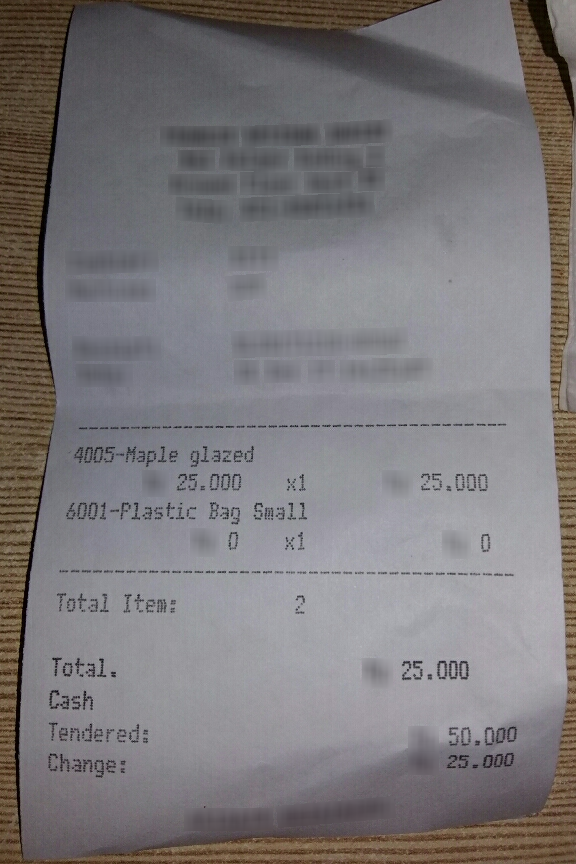
Extraigamos información de una sola imagen usando la API de Mistral.
import base64
from io import BytesIO
from typing import Any
from PIL.Image import Image

def format_image(image: Image) -> str:
    """
    Converts an image to a base64-encoded string with a JPEG format.

    Args:
        image (Image): The image to be formatted.

    Returns:
        str: The base64-encoded string with a data URI prefix.
    """
    # Convert image to base64
    buffer = BytesIO()
    image.save(buffer, format="JPEG")
    image_base64 = base64.b64encode(buffer.getvalue()).decode("utf-8")

    # Add the prefix for base64 format
    formatted_base64 = f"data:image/jpeg;base64,{image_base64}"
    return formatted_base64
from mistralai.client import Mistral
import os

api_key = os.environ["MISTRAL_API_KEY"]

client = Mistral(api_key=api_key)
# Define the messages for the chat
# Let's extract name, price, and get category for the item
messages = [
{
"role": "user",
"content": [
{
"type": "image_url",
"image_url": format_image(df.image[1])
},
{
"type": "text",
"text": "Extract the name and price of each item on the receipt, categorize each item into one of the following categories: 'Medical', 'Food', 'Beverage', 'Travel', or 'Other', and return the results as a well-structured JSON object. The JSON object should include only the fields: name, price, and classification for each item."
}
]
},
{"role": "assistant", "content": "{", "prefix": True},
]
# Get the chat response
chat_response = client.chat.complete(
model="pixtral-large-latest",
messages=messages,
response_format = {
"type": "json_object",
}
)
# Print the content of the response
print(chat_response.choices[0].message.content)
{
  "items": [
    {
      "name": "Maple glazed",
      "price": 25.000,
      "classification": "Food"
    },
    {
      "name": "Plastic Bag Small",
      "price": 0,
      "classification": "Other"
    }
  ]
}
Usar la API por lotes para procesar muchas imágenes
Crear un lote
Procesaremos 10 imágenes como ejemplo.
import json
from io import BytesIO

num_samples = 10

list_of_json = []
for idx in range(num_samples):
    request = {
        "custom_id": str(idx),
        "body": {
            "max_tokens": 1000,
            "messages": [
                {
                    "role": "user",
                    "content": [
                        {
                            "type": "image_url",
                            "image_url": format_image(df.image[idx])
                        },
                        {
                            "type": "text",
                            "text": "Identify the name and price of each item on the receipt, categorize each item into one of the following categories: 'Medical', 'Food', 'Beverage', 'Travel', or 'Other', and return the results as a well-structured JSON object. The JSON object should include only the fields: name, price, and classification for each item."
                        }
                    ]
                },
                {
                    "role": "assistant",
                    "content": "{",
                    "prefix": True
                }
            ],
        "response_format": {"type": "json_object"}
        }
    }
    list_of_json.append(json.dumps(request).encode("utf-8"))
Subir tu lote
batch_data = client.files.upload(
    file={
        "file_name": "file.jsonl",
        "content": b"\n".join(list_of_json)},
    purpose = "batch"
)batch_dataUploadFileOut(id='30f63bb3-6f9e-4dd5-9295-a9cdbdeabf75', object='file', bytes=1769058, created_at=1732400347, filename='file.jsonl', purpose='batch', sample_type='batch_request', source='upload', num_lines=10)Crear un trabajo por lotes
created_job = client.batch.jobs.create(
    input_files=[batch_data.id],
    model="pixtral-large-latest",
    endpoint="/v1/chat/completions",
    metadata={"job_type": "testing"}
)created_jobBatchJobOut(id='5befe8c6-b8cb-4858-a068-d600cf5ed73f', input_files=['30f63bb3-6f9e-4dd5-9295-a9cdbdeabf75'], endpoint='/v1/chat/completions', model='pixtral-large-latest', errors=[], status='QUEUED', created_at=1732400351, total_requests=0, completed_requests=0, succeeded_requests=0, failed_requests=0, OBJECT='batch', metadata={'job_type': 'testing'}, output_file=None, error_file=None, started_at=None, completed_at=None)Obtener detalles del trabajo por lotes
retrieved_job = client.batch.jobs.get(job_id=created_job.id)
retrieved_job
BatchJobOut(id='5befe8c6-b8cb-4858-a068-d600cf5ed73f', input_files=['30f63bb3-6f9e-4dd5-9295-a9cdbdeabf75'], endpoint='/v1/chat/completions', model='pixtral-large-latest', errors=[], status='SUCCESS', created_at=1732400351, total_requests=10, completed_requests=10, succeeded_requests=10, failed_requests=0, OBJECT='batch', metadata={'job_type': 'testing'}, output_file='950fae83-2802-40c0-a677-c7839a4e238a', error_file=None, started_at=1732400351, completed_at=1732400376)print(f"Total requests: {retrieved_job.total_requests}")
print(f"Failed requests: {retrieved_job.failed_requests}")
print(f"Successful requests: {retrieved_job.succeeded_requests}")
print(
f"Percent done: {round((retrieved_job.succeeded_requests + retrieved_job.failed_requests) / retrieved_job.total_requests, 4) * 100}")
Total requests: 10
Failed requests: 0
Successful requests: 10
Percent done: 100.0
Obtener resultados del lote
output = client.files.download(file_id=retrieved_job.output_file).read().decode("utf-8").strip()print(output){"id":"0-61c18c3c-1873-4288-9f92-af97f696fb2c","custom_id":"0","response":{"status_code":200,"body":{"id":"7f3874116cb943fea58853d60cf17ff3","object":"chat.completion","model":"pixtral-large-latest","usage":{"prompt_tokens":2898,"completion_tokens":88,"total_tokens":2986},"created":1732400353,"choices":[{"index":0,"finish_reason":"stop","message":{"role":"assistant","content":"{\n \"items\": [\n {\n \"name\": \"VANCOOLEN\",\n \"price\": 8182,\n \"classification\": \"Medical\"\n },\n {\n \"name\": \"PLASTIK 25\",\n \"price\": 0,\n \"classification\": \"Other\"\n }\n ]\n}","tool_calls":null}}]}},"error":null}
{"id":"1-18219f09-acff-4644-baec-a73b15788364","custom_id":"1","response":{"status_code":200,"body":{"id":"aaee50ed69384fe9ae8e9fe9c4bc0c55","object":"chat.completion","model":"pixtral-large-latest","usage":{"prompt_tokens":2080,"completion_tokens":86,"total_tokens":2166},"created":1732400354,"choices":[{"index":0,"finish_reason":"stop","message":{"role":"assistant","content":"{\n \"items\": [\n {\n \"name\": \"Maple glazed\",\n \"price\": 25.000,\n \"classification\": \"Food\"\n },\n {\n \"name\": \"Plastic Bag Small\",\n \"price\": 0,\n \"classification\": \"Other\"\n }\n ]\n}","tool_calls":null}}]}},"error":null}
{"id":"2-6ae7d6cb-4c00-4836-b182-b3a37c315c51","custom_id":"2","response":{"status_code":200,"body":{"id":"c5e88f4a35374ec3becfd756ceb7e80e","object":"chat.completion","model":"pixtral-large-latest","usage":{"prompt_tokens":2450,"completion_tokens":88,"total_tokens":2538},"created":1732400353,"choices":[{"index":0,"finish_reason":"stop","message":{"role":"assistant","content":"{\n \"items\": [\n {\n \"name\": \"DEPT04\",\n \"price\": 24000,\n \"classification\": \"Other\"\n },\n {\n \"name\": \"DEPT01\",\n \"price\": 22000,\n \"classification\": \"Other\"\n }\n ]\n}","tool_calls":null}}]}},"error":null}
{"id":"3-8a7f98e8-1e79-4b7b-8872-5675f56ab42e","custom_id":"3","response":{"status_code":200,"body":{"id":"8dd62429cb5b406ca120339fccc0cd55","object":"chat.completion","model":"pixtral-large-latest","usage":{"prompt_tokens":2898,"completion_tokens":58,"total_tokens":2956},"created":1732400353,"choices":[{"index":0,"finish_reason":"stop","message":{"role":"assistant","content":"{\n \"items\": [\n {\n \"name\": \"TAKOYAKI 12PCS\",\n \"price\": 30000,\n \"classification\": \"Food\"\n }\n ]\n}","tool_calls":null}}]}},"error":null}
{"id":"4-f14a0083-95c5-4f60-bae0-baf591aef3f2","custom_id":"4","response":{"status_code":200,"body":{"id":"c4c63eb1f77e44de8bb615b33a4d96ad","object":"chat.completion","model":"pixtral-large-latest","usage":{"prompt_tokens":2130,"completion_tokens":168,"total_tokens":2298},"created":1732400353,"choices":[{"index":0,"finish_reason":"stop","message":{"role":"assistant","content":"{\n \"items\": [\n {\n \"name\": \"Jamur Crispy\",\n \"price\": 13500,\n \"classification\": \"Food\"\n },\n {\n \"name\": \"Nasi Putih\",\n \"price\": 7000,\n \"classification\": \"Food\"\n },\n {\n \"name\": \"Sambel Kecap\",\n \"price\": 4500,\n \"classification\": \"Food\"\n },\n {\n \"name\": \"Es Teh\",\n \"price\": 7500,\n \"classification\": \"Beverage\"\n }\n ]\n}","tool_calls":null}}]}},"error":null}
{"id":"5-aacc6428-9266-4690-aa2c-47b84ec06189","custom_id":"5","response":{"status_code":200,"body":{"id":"bd959d8edc234e5585dbfb8d0005ffe4","object":"chat.completion","model":"pixtral-large-latest","usage":{"prompt_tokens":3218,"completion_tokens":100,"total_tokens":3318},"created":1732400353,"choices":[{"index":0,"finish_reason":"stop","message":{"role":"assistant","content":"{\n \"items\": [\n {\n \"name\": \"118 Round Wagyu (1gr)\",\n \"price\": 47.200,\n \"classification\": \"Food\"\n },\n {\n \"name\": \"1 Wagyu Rice Box\",\n \"price\": 10.000,\n \"classification\": \"Food\"\n }\n ]\n}","tool_calls":null}}]}},"error":null}
{"id":"6-70a513f7-732d-47d4-a4fe-52941107e534","custom_id":"6","response":{"status_code":200,"body":{"id":"7ed84ab380d54ad69f774b4149a26147","object":"chat.completion","model":"pixtral-large-latest","usage":{"prompt_tokens":2080,"completion_tokens":94,"total_tokens":2174},"created":1732400353,"choices":[{"index":0,"finish_reason":"stop","message":{"role":"assistant","content":"{\n \"items\": [\n {\n \"name\": \"Silky Green Tea\",\n \"price\": 12500,\n \"classification\": \"Beverage\"\n },\n {\n \"name\": \"Silky Hazelnut\",\n \"price\": 12500,\n \"classification\": \"Beverage\"\n }\n ]\n}","tool_calls":null}}]}},"error":null}
{"id":"7-e6225030-c9d7-42a5-8834-eb655a0afdaa","custom_id":"7","response":{"status_code":200,"body":{"id":"28e76cc88e5249188ec4ecc1b63856fd","object":"chat.completion","model":"pixtral-large-latest","usage":{"prompt_tokens":2898,"completion_tokens":55,"total_tokens":2953},"created":1732400353,"choices":[{"index":0,"finish_reason":"stop","message":{"role":"assistant","content":"{\n \"items\": [\n {\n \"name\": \"THAI ICED TEA\",\n \"price\": 40.000,\n \"classification\": \"Beverage\"\n }\n ]\n}","tool_calls":null}}]}},"error":null}
{"id":"8-9614eb6b-cb35-4d86-aa2c-1432db6d7874","custom_id":"8","response":{"status_code":200,"body":{"id":"8b55ceb5bb554091a7b6d88083c9a49e","object":"chat.completion","model":"pixtral-large-latest","usage":{"prompt_tokens":2080,"completion_tokens":51,"total_tokens":2131},"created":1732400353,"choices":[{"index":0,"finish_reason":"stop","message":{"role":"assistant","content":"{\n \"items\": [\n {\n \"name\": \"BBQ Chicken\",\n \"price\": 41000,\n \"classification\": \"Food\"\n }\n ]\n}","tool_calls":null}}]}},"error":null}
{"id":"0-5565de65-a128-4828-bec1-5162f1b8c376","custom_id":"9","response":{"status_code":200,"body":{"id":"8096776b2d25495d9e226000f58f08fe","object":"chat.completion","model":"pixtral-large-latest","usage":{"prompt_tokens":2080,"completion_tokens":57,"total_tokens":2137},"created":1732400353,"choices":[{"index":0,"finish_reason":"stop","message":{"role":"assistant","content":"{\n \"items\": [\n {\n \"name\": \"KOREAN CURRY M\",\n \"price\": 40.909,\n \"classification\": \"Food\"\n }\n ]\n}","tool_calls":null}}]}},"error":null}Extraer información a un dataframe de Pandas
# Parse JSON lines
lines = output.strip().split('\n')

# Extract required fields
extracted_data = []
for line in lines:
    parsed_line = json.loads(line)
    custom_id = parsed_line.get("custom_id")
    response = parsed_line.get("response", {})
    body = response.get("body", {})
    choices = body.get("choices", [])

    for choice in choices:
        message_content = choice.get("message", {}).get("content", "")
        # Extract items from the JSON string in "content"
        try:
            items_data = json.loads(message_content.strip('```'))
            items = items_data if isinstance(items_data, list) else items_data.get("items", [])
            for item in items:
                extracted_data.append({
                    "custom_id": custom_id,
                    "name": item.get("name"),
                    "price": item.get("price"),
                    "classification": item.get("classification")
                })
        except json.JSONDecodeError:
            continue

# Create a Pandas DataFrame
df_output = pd.DataFrame(extracted_data)
df_outputcustom_id name price classification
0 0 VANCOOLEN 8182.000 Medical
1 0 PLASTIK 25 0.000 Other
2 1 Maple glazed 25.000 Food
3 1 Plastic Bag Small 0.000 Other
4 2 DEPT04 24000.000 Other
5 2 DEPT01 22000.000 Other
6 3 TAKOYAKI 12PCS 30000.000 Food
7 4 Jamur Crispy 13500.000 Food
8 4 Nasi Putih 7000.000 Food
9 4 Sambel Kecap 4500.000 Food
10 4 Es Teh 7500.000 Beverage
11 5 118 Round Wagyu (1gr) 47.200 Food
12 5 1 Wagyu Rice Box 10.000 Food
13 6 Silky Green Tea 12500.000 Beverage
14 6 Silky Hazelnut 12500.000 Beverage
15 7 THAI ICED TEA 40.000 Beverage
16 8 BBQ Chicken 41000.000 Food
17 9 KOREAN CURRY M 40.909 Food| custom_id | name | price | classification | |
|---|---|---|---|---|
| 0 | 0 | VANCOOLEN | 8182.000 | Medical |
| 1 | 0 | PLASTIK 25 | 0.000 | Other |
| 2 | 1 | Maple glazed | 25.000 | Food |
| 3 | 1 | Plastic Bag Small | 0.000 | Other |
| 4 | 2 | DEPT04 | 24000.000 | Other |
| 5 | 2 | DEPT01 | 22000.000 | Other |
| 6 | 3 | TAKOYAKI 12PCS | 30000.000 | Food |
| 7 | 4 | Jamur Crispy | 13500.000 | Food |
| 8 | 4 | Nasi Putih | 7000.000 | Food |
| 9 | 4 | Sambel Kecap | 4500.000 | Food |
| 10 | 4 | Es Teh | 7500.000 | Beverage |
| 11 | 5 | 118 Round Wagyu (1gr) | 47.200 | Food |
| 12 | 5 | 1 Wagyu Rice Box | 10.000 | Food |
| 13 | 6 | Silky Green Tea | 12500.000 | Beverage |
| 14 | 6 | Silky Hazelnut | 12500.000 | Beverage |
| 15 | 7 | THAI ICED TEA | 40.000 | Beverage |
| 16 | 8 | BBQ Chicken | 41000.000 | Food |
| 17 | 9 | KOREAN CURRY M | 40.909 | Food |