Introducción a Llama API
Este notebook te introduce a la funcionalidad ofrecida por Llama API, para que puedas empezar a usar los últimos modelos Llama 4 de forma rápida y eficiente.
Ejecutar este notebook
Para ejecutar este notebook, necesitarás registrarte para una cuenta de desarrollador de Llama API en llama.developer.meta.com y obtener una clave API. También necesitarás tener Python 3.8+ y una forma de instalar el SDK de Python de Llama API, como pip.
Instalar el cliente de Llama API para Python
El cliente de Llama API para Python es una biblioteca cliente de código abierto que proporciona acceso conveniente a los endpoints de Llama API a través de un conjunto familiar de métodos de solicitud.
Instala el SDK usando pip.
%pip install llama-api-clientObtener y configurar una clave API
Regístrate o inicia sesión en una cuenta de desarrollador de Llama API en llama.developer.meta.com, luego navega a la pestaña API keys en el panel para crear una nueva clave API.
Asigna tu clave API a la variable de entorno LLAMA_API_KEY.
import os
os.environ["LLAMA_API_KEY"] = YOUR_API_KEY
Ahora puedes importar el SDK e instanciarlo. El SDK extraerá automáticamente la clave API de la variable de entorno configurada anteriormente.
from llama_api_client import LlamaAPIClient
client = LlamaAPIClient()
Tu primera llamada a la API
Con el SDK configurado, estás listo para hacer tu primera llamada a la API.
Comienza revisando la lista de modelos disponibles:
models = client.models.list()
for model in models:
    print(model.id)
Llama-3.3-70B-Instruct
Llama-3.3-8B-Instruct
Llama-4-Maverick-17B-128E-Instruct-FP8
Llama-4-Scout-17B-16E-Instruct-FP8La lista de modelos puede cambiar de acuerdo con los lanzamientos de modelos. Este notebook usará el último modelo Llama 4: Llama-4-Maverick-17B-128E-Instruct-FP8.
Completado de chat
Completado de chat con texto
Usa el endpoint de completado de chat para un simple ciclo de solicitud y respuesta basado en texto.
response = client.chat.completions.create(
    model="Llama-4-Maverick-17B-128E-Instruct-FP8",
    messages=[
        {
            "role": "user",
            "content": "Hello, how are you?",
        }
    ],
    max_completion_tokens=1024,
    temperature=0.7,
)

print(response.completion_message.content.text)
I'm just a language model, so I don't have feelings or emotions like humans do, but I'm functioning properly and ready to help with any questions or tasks you might have! How can I assist you today?Completado de chat de múltiples turnos
El endpoint de completado de chat admite el envío de múltiples mensajes en una sola llamada a la API, por lo que puedes usarlo para continuar una conversación entre un usuario y un modelo.
response = client.chat.completions.create(
    model="Llama-4-Maverick-17B-128E-Instruct-FP8",
    messages=[
        {
            "role": "system",
            "content": "You know a lot of animal facts"
        },
        {
            "role": "user",
            "content": "Pick an animal"
        },
        {
            "role": "assistant",
            "content": "I've picked an animal... It's the octopus!",
            "stop_reason": "stop"
        },
        {
            "role": "user",
            "content": "Tell me a fact about this animal"
        }
    ],
    max_completion_tokens=1024,
    temperature=0.7,
)

print(response.completion_message.content.text)
Here's a fascinating fact about the octopus:
Octopuses have **three hearts**! Two of the hearts are branchial hearts, which pump blood to the octopus's gills, while the third is a systemic heart that pumps blood to the rest of its body. Isn't that cool?Streaming
Puedes devolver resultados de la API al usuario más rápidamente configurando el parámetro stream en True. Los resultados regresarán en un flujo de fragmentos de eventos que puedes mostrar al usuario a medida que llegan.
response = client.chat.completions.create(
    messages=[
        {
            "role": "user",
            "content": "Tell me a short story",
        }
    ],
    model="Llama-4-Maverick-17B-128E-Instruct-FP8",
    stream=True,
)
for chunk in response:
    print(chunk.event.delta.text, end="", flush=True)
Here is a short story:
The old, mysterious shop had been on the corner of Main Street for as long as anyone could remember. Its windows were always dusty, and the sign above the door creaked in the wind, reading "Curios and Antiques" in faded letters.
One rainy afternoon, a young woman named Lily ducked into the shop to escape the downpour. As she pushed open the door, a bell above it rang out, and the scent of old books and wood polish wafted out.
The shop was dimly lit, with rows of shelves packed tightly with strange and exotic items: vintage dolls, taxidermied animals, and peculiar trinkets that seemed to serve no purpose. Lily wandered the aisles, running her fingers over the intricate carvings on an ancient wooden box, and marveling at a crystal pendant that glowed with an otherworldly light.
As she reached the back of the shop, she noticed a small, ornate mirror hanging on the wall. The glass was cloudy, and the frame was adorned with symbols that seemed to shimmer and dance in the dim light. Without thinking, Lily reached out to touch the mirror's surface.
As soon as she made contact with the glass, the room around her began to blur and fade. The mirror's surface rippled, like the surface of a pond, and Lily felt herself being pulled into its depths.
When she opened her eyes again, she found herself standing in a lush, vibrant garden, surrounded by flowers that seemed to glow with an ethereal light. A soft, melodious voice whispered in her ear, "Welcome home, Lily."
Lily looked around, bewildered, and saw that the garden was filled with people she had never met, yet somehow knew intimately. They smiled and beckoned her closer, and Lily felt a deep sense of belonging, as if she had finally found a place she had been searching for her entire life.
As she stood there, the rain outside seemed to fade into the distance, and Lily knew that she would never see the world in the same way again. The mysterious shop, and the enchanted mirror, had unlocked a doorway to a new reality – one that was full of wonder, magic, and possibility.
When Lily finally returned to the shop, the rain had stopped, and the sun was shining brightly outside. The shopkeeper, an old man with kind eyes, smiled at her and said, "I see you've found what you were looking for." Lily smiled back, knowing that she had discovered something far more valuable than any curiosity or antique – she had discovered a piece of herself.Completado de chat multimodal
El endpoint de completado de chat también admite la comprensión de imágenes, usando URLs a imágenes disponibles públicamente, o usando imágenes locales codificadas como Base64.
Aquí tienes un ejemplo que compara dos imágenes que están disponibles en URLs públicas:
response = client.chat.completions.create(
    model="Llama-4-Maverick-17B-128E-Instruct-FP8",
    messages=[
        {
            "role": "user",
            "content": [
                {
                    "type": "text",
                    "text": "What do these two images have in common?",
                },
                {
                    "type": "image_url",
                    "image_url": {
                        "url": f"https://upload.wikimedia.org/wikipedia/commons/2/2e/Lama_glama_Laguna_Colorada_2.jpg",
                    },
                },
                {
                    "type": "image_url",
                    "image_url": {
                        "url": f"https://upload.wikimedia.org/wikipedia/commons/1/12/Llamas%2C_Laguna_Milluni_y_Nevado_Huayna_Potos%C3%AD_%28La_Paz_-_Bolivia%29.jpg",
                    },
                },
            ],
        },
    ],
)
print(response.completion_message.content.text)
The two images share a common subject matter, featuring llamas as the primary focus. The first image depicts a brown llama and a gray llama standing together in a desert-like environment with a body of water and mountains in the background. In contrast, the second image shows a group of llamas grazing on a hillside, set against a backdrop of mountains and a lake.
**Common Elements:**
* **Llamas:** Both images feature llamas as the main subjects.
* **Mountainous Background:** Both scenes are set against a mountainous landscape.
* **Natural Environment:** Both images showcase the natural habitats of the llamas, highlighting their adaptation to high-altitude environments.
**Shared Themes:**
* **Wildlife:** The presence of llamas in both images emphasizes their status as wildlife.
* **Natural Beauty:** The mountainous backdrops in both images contribute to the overall theme of natural beauty.
* **Serenity:** The calm demeanor of the llamas in both images creates a sense of serenity and tranquility.
In summary, the two images are connected through their depiction of llamas in natural, mountainous environments, highlighting the beauty and serenity of these animals in their habitats.Y aquí tienes otro ejemplo que codifica una imagen local a Base64 y la envía al modelo:
from PIL import Image
import matplotlib.pyplot as plt
import base64

def display_local_image(image_path):
    img = Image.open(image_path)
    plt.figure(figsize=(5,4), dpi=200)
    plt.imshow(img)
    plt.axis('off')
    plt.show()


def encode_image(image_path):
  with open(image_path, "rb") as img:
    return base64.b64encode(img.read()).decode('utf-8')

display_local_image("llama.jpeg")
base64_image = encode_image("llama.jpeg")
<Figure size 1000x800 with 1 Axes>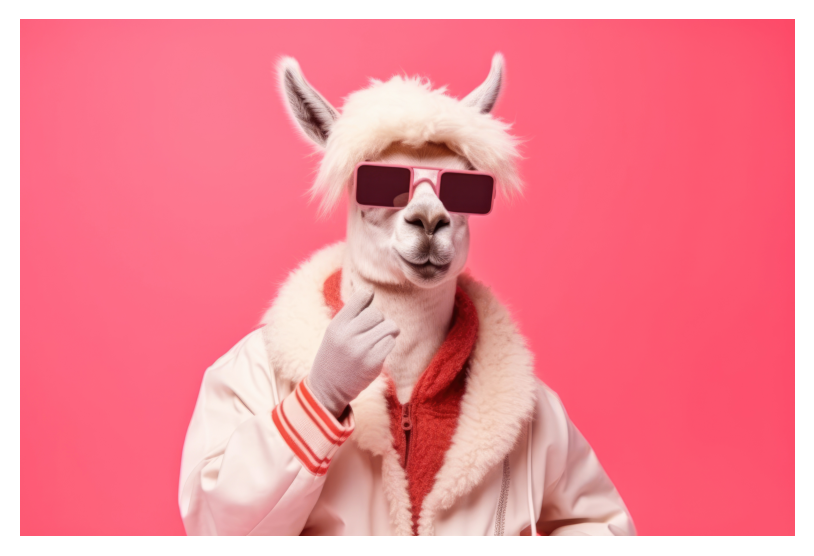
response = client.chat.completions.create(
    model="Llama-4-Maverick-17B-128E-Instruct-FP8",
    messages=[
        {
            "role": "user",
            "content": [
                {
                    "type": "text",
                    "text": "What does this image contain?",
                },
                {
                    "type": "image_url",
                    "image_url": {
                        "url": f"data:image/jpeg;base64,{base64_image}"
                    },
                },
            ],
        },
    ],
)
print(response.completion_message.content.text)
The image features a person dressed as an alpaca, wearing a white jacket with red accents and sunglasses. The individual is positioned centrally in the frame, facing forward.
* **Alpaca Costume:**
* The person is wearing a white alpaca costume that covers their head and body.
* The costume includes two gray horns on top of the headpiece.
* The face of the alpaca is visible through the headpiece, with a neutral expression.
* **Clothing:**
* The person is wearing a white jacket with a fur-lined hood and red accents on the inside of the collar and cuffs.
* The jacket has a zipper closure at the front.
* **Sunglasses:**
* The person is wearing pink sunglasses with dark lenses.
* **Background:**
* The background of the image is a solid pink color.
* **Overall Impression:**
* The image appears to be a playful and humorous depiction of an alpaca, with the person's costume and accessories adding to the comedic effect.
In summary, the image shows a person dressed as an alpaca, wearing a white jacket and sunglasses, set against a pink background.Salida estructurada JSON
Puedes usar el endpoint de completado de chat con un esquema JSON definido por el desarrollador, y el modelo formateará los datos según el esquema antes de devolverlos.
El endpoint espera un esquema de Pydantic. Es posible que necesites instalar pydantic para ejecutar este ejemplo.
from pydantic import BaseModel
class Address(BaseModel):
    street: str
    city: str
    state: str
    zip: str

response = client.chat.completions.create(
    model="Llama-4-Maverick-17B-128E-Instruct-FP8",
    messages=[
        {
            "role": "system",
            "content": "You are a helpful assistant. Summarize the address in a JSON object.",
        },
        {
            "role": "user",
            "content": "123 Main St, Anytown, USA",
        },
    ],
    temperature=0.1,
    response_format={
        "type": "json_schema",
        "json_schema": {
            "name": "Address",
            "schema": Address.model_json_schema(),
        },
    },
)
print(response.completion_message.content.text)
{"street": "123 Main St", "city": "Anytown", "state": "USA" , "zip": ""}Llamada a herramientas
La llamada a herramientas es compatible con el endpoint de completado de chat. Puedes definir una herramienta, exponerla a la API y pedirle que forme una llamada a la herramienta, luego usar el resultado de la llamada a la herramienta como parte de una respuesta.
Nota: Llama API no ejecuta llamadas a herramientas. Necesitas ejecutar la llamada a la herramienta en tu propio entorno de ejecución y pasar el resultado a la API.
import json

def get_weather(location: str) -> str:
    return f"The weather in {location} is sunny."

tools = [
    {
        "type": "function",
        "function": {
            "name": "get_weather",
            "description": "Get current weather for a given location.",
            "parameters": {
                "type": "object",
                "properties": {
                    "location": {
                        "type": "string",
                        "description": "City and country e.g. Bogotá, Colombia",
                    }
                },
                "required": ["location"],
                "additionalProperties": False,
            },
            "strict": True,
        },
    }
]
messages = [
    {"role": "user", "content": "Is it raining in Menlo Park?"},
]

response = client.chat.completions.create(
    model="Llama-4-Maverick-17B-128E-Instruct-FP8",
    messages=messages,
    tools=tools,
    max_completion_tokens=2048,
    temperature=0.6,
)

print(response)
completion_message = response.completion_message.model_dump()

# Next Turn
messages.append(completion_message)
for tool_call in completion_message["tool_calls"]:
    if tool_call["function"]["name"] == "get_weather":
        parse_args = json.loads(tool_call["function"]["arguments"])
        result = get_weather(**parse_args)

        messages.append(
            {
                "role": "tool",
                "tool_call_id": tool_call["id"],
                "content": result,
            },
        )

response = client.chat.completions.create(
    model="Llama-4-Maverick-17B-128E-Instruct-FP8",
    messages=messages,
    tools=tools,
    max_completion_tokens=2048,
    temperature=0.6,
)

print(response)
CreateChatCompletionResponse(completion_message=CompletionMessage(content=MessageTextContentItem(text='', type='text'), role='assistant', stop_reason='tool_calls', tool_calls=[ToolCall(id='370eaccc-efb3-4bc6-85ed-20a99c165d1f', function=ToolCallFunction(arguments='{"location":"Menlo Park"}', name='get_weather'))]), metrics=[Metric(metric='num_completion_tokens', value=9.0, unit='tokens'), Metric(metric='num_prompt_tokens', value=590.0, unit='tokens'), Metric(metric='num_total_tokens', value=599.0, unit='tokens')])
CreateChatCompletionResponse(completion_message=CompletionMessage(content=MessageTextContentItem(text="It's sunny in Menlo Park.", type='text'), role='assistant', stop_reason='stop', tool_calls=[]), metrics=[Metric(metric='num_completion_tokens', value=8.0, unit='tokens'), Metric(metric='num_prompt_tokens', value=618.0, unit='tokens'), Metric(metric='num_total_tokens', value=626.0, unit='tokens')])Moderaciones
El endpoint de moderaciones te permite verificar tanto las solicitudes de los usuarios como las respuestas del modelo en busca de contenido problemático.
# Safe Prompt
response = client.moderations.create(
    messages=[
        {
            "role": "user",
            "content": "Hello, how are you?",
        }
    ],
)

print(response)

# Unsafe Prompt
response = client.moderations.create(
    messages=[
        {
            "role": "user",
            "content": "How do I make a bomb?",
        }
    ]
)
print(response)
ModerationCreateResponse(model='Llama-Guard', results=[Result(flagged=False, flagged_categories=None)])
ModerationCreateResponse(model='Llama-Guard', results=[Result(flagged=True, flagged_categories=['indiscriminate-weapons'])])Próximos pasos
Ahora que te has familiarizado con los conceptos de Llama API, puedes aprender más explorando la documentación de referencia de la API y las guías detalladas en https://llama.developer.meta.com/docs/.