Búsqueda semántica multimodal
Copyright 2026 Google LLC.
#@title Licensed under the Apache License, Version 2.0 (the "License");
# you may not use this file except in compliance with the License.
# You may obtain a copy of the License at
#
# https://www.apache.org/licenses/LICENSE-2.0
#
# Unless required by applicable law or agreed to in writing, software
# distributed under the License is distributed on an "AS IS" BASIS,
# WITHOUT WARRANTIES OR CONDITIONS OF ANY KIND, either express or implied.
# See the License for the specific language governing permissions and
# limitations under the License.
Autor: @NaveenKumarG-dev

Este notebook demuestra la búsqueda semántica multimodal y la recuperación entre modos usando el modelo gemini-embedding-2 y el SDK oficial de Python google-genai.
Aprenderás a:
- Configurar el SDK
google-genaiy autenticarte con tu clave API. - Construir un conjunto de datos mixto con nombres de archivo intencionalmente engañosos para resaltar el poder de la búsqueda semántica.
- Cargar archivos de diferentes tipos y prepararlos para la generación de embeddings.
- Generar embeddings multimodales para contenido de texto e imagen usando
gemini-embedding-2. - Realizar búsquedas de similitud semántica usando la similitud del coseno.
- Ejecutar recuperación entre modos con consultas en lenguaje natural.
- Visualizar los resultados recuperados y comparar la búsqueda semántica con la búsqueda por palabras clave.
Consulta la página de precios y la documentación del modelo para obtener los detalles más recientes.
Configuración
Instala el SDK
%pip install -U -q "google-genai>=1.0.0"[2K [90m━━━━━━━━━━━━━━━━━━━━━━━━━━━━━━━━━━━━━━━━[0m [32m55.8/55.8 kB[0m [31m2.0 MB/s[0m eta [36m0:00:00[0m
[2K [90m━━━━━━━━━━━━━━━━━━━━━━━━━━━━━━━━━━━━━━━━[0m [32m1.0/1.0 MB[0m [31m20.2 MB/s[0m eta [36m0:00:00[0m
[2K [90m━━━━━━━━━━━━━━━━━━━━━━━━━━━━━━━━━━━━━━━━[0m [32m258.6/258.6 kB[0m [31m22.6 MB/s[0m eta [36m0:00:00[0m
[?25h[31mERROR: pip's dependency resolver does not currently take into account all the packages that are installed. This behaviour is the source of the following dependency conflicts.
google-colab 1.0.0 requires google-auth==2.49.0, but you have google-auth 2.56.2 which is incompatible.[0m[31m
[0mConfigura tu clave API
Para ejecutar la siguiente celda, tu clave API debe estar almacenada en un Secreto de Colab llamado GEMINI_API_KEY. Si aún no tienes una clave API, o no estás seguro de cómo crear un Secreto de Colab, consulta el inicio rápido de Autenticación para ver un tutorial.
from google.colab import userdata
from google import genai

GEMINI_API_KEY = userdata.get('GEMINI_API_KEY')
client = genai.Client(api_key=GEMINI_API_KEY)
Selecciona el modelo de embedding
Usarás gemini-embedding-2, que mapea texto e imágenes en un espacio vectorial compartido, permitiendo comparaciones entre modos.
EMBEDDING_MODEL = "gemini-embedding-2" # @param ["gemini-embedding-2"] {"allow-input": true, isTemplate: true}Importa librerías
import os
import mimetypes
import numpy as np

from PIL import Image
from typing import Any
from IPython.display import display, HTML
Construye el conjunto de datos
Para resaltar el poder de la búsqueda semántica, crearás un pequeño conjunto de datos local con nombres de archivo intencionalmente engañosos. Por ejemplo, una imagen de un perro se guarda como cat_image.png, mientras que un archivo de texto sobre el océano se llama space_facts.txt.
Una búsqueda tradicional por palabras clave para "gato" encontraría cat_image.png debido a su nombre. La búsqueda semántica, sin embargo, analiza el contenido en sí mismo, por lo que al consultar por "perro" se recupera correctamente cat_image.png porque su contenido es un perro.
Las imágenes a continuación provienen de Wikimedia Commons y están licenciadas bajo Creative Commons (CC-BY-SA o similar). Consulta las páginas de archivos individuales de Wikimedia Commons para obtener detalles exactos de la licencia. Los documentos de texto son contenido original.
import requests

DATA_DIR = "multimodal_data"
os.makedirs(DATA_DIR, exist_ok=True)

# Publicly accessible, stable image URLs (Wikimedia Commons, CC0/public domain)
DATASET = [
    {
        "filename": "cat_image.png",       # Misleading: actually a dog
        "content_type": "image",
        "true_label": "dog",
        "image_url": "https://upload.wikimedia.org/wikipedia/commons/2/26/YellowLabradorLooking_new.jpg",
    },
    {
        "filename": "dog_picture.jpg",      # Misleading: actually a cat
        "content_type": "image",
        "true_label": "cat",
        "image_url": "https://upload.wikimedia.org/wikipedia/commons/1/11/Fluffy_Cat.jpg",
    },
    {
        "filename": "ocean_view.jpg",       # Misleading: actually a mountain
        "content_type": "image",
        "true_label": "mountain",
        "image_url": "https://upload.wikimedia.org/wikipedia/commons/e/e7/Everest_North_Face_toward_Base_Camp_Tibet_Luca_Galuzzi_2006.jpg",
    },
    {
        "filename": "space_facts.txt",      # Misleading: actually about the ocean
        "content_type": "text",
        "true_label": "ocean",
        "text_content": (
            "The ocean covers more than 70% of the Earth's surface. "
            "It is home to a vast diversity of marine life, from microscopic "
            "plankton to giant whales. The deepest point, the Mariana Trench, "
            "plunges nearly 11 kilometres below the surface."
        ),
    },
    {
        "filename": "mountain_climbing.txt", # Misleading: actually about stars
        "content_type": "text",
        "true_label": "stars",
        "text_content": (
            "The night sky is filled with billions of stars, planets, and galaxies. "
            "On a clear night, away from city lights, you can observe the Milky Way "
            "arching across the sky. Constellations like Orion and the Big Dipper "
            "have guided navigators for centuries."
        ),
    },
    {
        "filename": "bird_song.txt",        # Misleading: actually about a car
        "content_type": "text",
        "true_label": "car",
        "text_content": (
            "The sleek red sports car accelerated down the coastal road, "
            "its powerful engine a symphony of finely tuned machinery. "
            "It hugged every curve effortlessly, a blur of speed against the deep blue sea."
        ),
    },
]


def download_image(url: str, filename: str) -> None:
    """Downloads an image from a URL and saves it to DATA_DIR."""
    dest = os.path.join(DATA_DIR, filename)
    # Wikimedia Commons requires a User-Agent header to prevent 403 blocks
    headers = {
        "User-Agent": "GeminiAPICookbook/1.0 (https://github.com/google-gemini/cookbook)"
    }
    response = requests.get(url, headers=headers, timeout=30)
    response.raise_for_status()
    with open(dest, "wb") as f:
        f.write(response.content)
    print(f"Downloaded  {filename}")


# Create the dataset files
for item in DATASET:
    file_path = os.path.join(DATA_DIR, item["filename"])
    if item["content_type"] == "image":
        if not os.path.exists(file_path):
            download_image(item["image_url"], item["filename"])
        else:
            print(f"Already exists: {item['filename']}")
    else:
        if not os.path.exists(file_path):
            with open(file_path, "w", encoding="utf-8") as f:
                f.write(item["text_content"])
            print(f"Created       {item['filename']}")
        else:
            print(f"Already exists: {item['filename']}")

print(f"\nDataset ready in '{DATA_DIR}/'")
Downloaded cat_image.png
Downloaded dog_picture.jpg
Downloaded ocean_view.jpg
Created space_facts.txt
Created mountain_climbing.txt
Created bird_song.txt
Dataset ready in 'multimodal_data/'Carga archivos
Carga cada archivo y detecta su tipo MIME. Las imágenes se abren como objetos PIL.Image; los archivos de texto se leen como cadenas de texto sin formato.
# @title Helper — guess_mime_type and load_file_content

def guess_mime_type(file_path: str) -> str:
    """Guess the MIME type of a file with a robust fallback mapping."""
    mime_type, _ = mimetypes.guess_type(file_path)
    if not mime_type:
        ext = os.path.splitext(file_path)[1].lower()
        if ext in [".png", ".webp", ".bmp", ".gif"]:
            mime_type = f"image/{ext[1:]}"
        elif ext in [".jpg", ".jpeg"]:
            mime_type = "image/jpeg"
        elif ext in [".txt", ".md", ".py", ".json", ".csv"]:
            mime_type = "text/plain"
        else:
            mime_type = "application/octet-stream"
    return mime_type


def load_file_content(file_path: str) -> str | Image.Image:
    """Loads file content based on its MIME type.

    Args:
        file_path: Path to the file.

    Returns:
        A str for text files, or a PIL.Image.Image for image files.

    Raises:
        FileNotFoundError: If the file does not exist.
        ValueError: If the MIME type is not supported.
    """
    if not os.path.exists(file_path):
        raise FileNotFoundError(f"File not found: {file_path}")

    mime_type = guess_mime_type(file_path)

    if mime_type.startswith("image"):
        return Image.open(file_path).convert("RGB")
    elif mime_type.startswith("text"):
        with open(file_path, "r", encoding="utf-8") as f:
            return f.read()
    else:
        raise ValueError(
            f"Unsupported MIME type '{mime_type}' for file: {file_path}"
        )
loaded_files = []
print(f"Loading files from '{DATA_DIR}/'...")
for root, _, filenames in os.walk(DATA_DIR):
for filename in sorted(filenames):
file_path = os.path.join(root, filename)
mime_type = guess_mime_type(file_path)
try:
content = load_file_content(file_path)
loaded_files.append(
{
"filename": filename,
"path": file_path,
"mime_type": mime_type,
"content": content,
}
)
print(f" Loaded {filename} ({mime_type})")
except (FileNotFoundError, ValueError) as e:
print(f" Skipped {filename}: {e}")
print(f"\nTotal files loaded: {len(loaded_files)}")Loading files from 'multimodal_data/'...
Loaded bird_song.txt (text/plain)
Loaded cat_image.png (image/png)
Loaded dog_picture.jpg (image/jpeg)
Loaded mountain_climbing.txt (text/plain)
Loaded ocean_view.jpg (image/jpeg)
Loaded space_facts.txt (text/plain)
Total files loaded: 6Genera embeddings
Usa client.models.embed_content para generar un vector para cada archivo.
El modelo gemini-embedding-2 es multimodal. Para casos de uso relacionados con la recuperación, el modelo se basa en prefijos de tarea estructurados en las entradas para salvar la asimetría entre consultas y documentos.
Mejores prácticas para formatear entradas:
- Consulta de búsqueda — Prefija la consulta con:
task: search result | query: {query_text} - Documento de texto — Formatea como:
title: {filename} | text: {document_content} - Documento de imagen — Intercala una parte de texto que contenga
title: {filename} | text:seguida de la parte de bytes de la imagen (obtenida usandotypes.Part.from_bytes(...)).
# @title Helper — generate_embedding

from google.genai import types as genai_types


def generate_embedding(
    content: str | bytes,
    mime_type: str | None = None,
    is_query: bool = False,
    title: str | None = None,
) -> list[float]:
    """Generates an embedding vector for text or image content.

    Args:
        content: A text string or raw bytes (for images).
        mime_type: The MIME type of the content (required if content is bytes).
        is_query: True if generating embedding for a search query.
        title: The document title/filename (used for documents).

    Returns:
        A list of floats representing the embedding vector.

    Note:
        For real applications, consider using a library like numpy to handle vector arithmetic.
    """
    if is_query:
        # Format the query according to gemini-embedding-2 best practices
        input_content = f"task: search result | query: {content}"
    else:
        doc_title = title if title else "none"
        if isinstance(content, bytes):
            if not mime_type:
                raise ValueError("mime_type is required for binary content (bytes)")
            # Interleave document title prefix with the image part
            input_content = [
                f"title: {doc_title} | text: ",
                genai_types.Part.from_bytes(
                    data=content,
                    mime_type=mime_type,
                )
            ]
        else:
            # Format text document with title and content
            input_content = f"title: {doc_title} | text: {content}"

    response = client.models.embed_content(
        model=EMBEDDING_MODEL,
        contents=input_content,
    )
    return response.embeddings[0].values
# Build the indexed corpus by generating an embedding for each file.
indexed_corpus = []
print("Generating embeddings...")
for item in loaded_files:
try:
if item["mime_type"].startswith("image"):
# Read binary file bytes for image embeddings
with open(item["path"], "rb") as f:
embed_data = f.read()
mime_type = item["mime_type"]
else:
# Use plain string for text embeddings
embed_data = item["content"]
mime_type = None
embedding = generate_embedding(
embed_data,
mime_type=mime_type,
is_query=False,
title=item["filename"],
)
indexed_corpus.append(
{
"filename": item["filename"],
"path": item["path"],
"mime_type": item["mime_type"],
"content_type": "image" if item["mime_type"].startswith("image") else "text",
"content": item["content"],
"embedding": embedding,
}
)
print(f" Embedded {item['filename']}")
except Exception as e: # pylint: disable=broad-except
print(f" Error embedding {item['filename']}: {e}")
print(f"\nCorpus size: {len(indexed_corpus)} items")Generating embeddings...
Embedded bird_song.txt
Embedded cat_image.png
Embedded dog_picture.jpg
Embedded mountain_climbing.txt
Embedded ocean_view.jpg
Embedded space_facts.txt
Corpus size: 6 itemsBusca en el corpus
Define la función de similitud y el asistente de búsqueda. La similitud del coseno mide el ángulo entre dos vectores; los valores más cercanos a 1.0 indican una mayor similitud semántica.
# @title Helper — cosine_similarity and search_similar_content


def cosine_similarity(vec1: list[float], vec2: list[float]) -> float:
    """Returns the cosine similarity between two embedding vectors."""
    # Since gemini-embedding-2 vectors are normalized unit vectors,
    # cosine similarity simplifies to the dot product.
    return float(np.dot(vec1, vec2))


def search_similar_content(
    query_text: str,
    corpus: list[dict[str, Any]],
    top_k: int = 3,
) -> list[dict[str, Any]]:
    """Performs semantic search against the indexed corpus.

    Args:
        query_text: The natural language query.
        corpus: The list of embedded items.
        top_k: Number of top results to return.

    Returns:
        A list of the top_k most similar items, sorted by score descending.
    """
    # Embed the query with the is_query=True flag
    query_embedding = generate_embedding(query_text, is_query=True)

    scored = [
        {
            **{k: v for k, v in item.items() if k != "embedding"},
            "score": cosine_similarity(query_embedding, item["embedding"]),
        }
        for item in corpus
    ]
    scored.sort(key=lambda x: x["score"], reverse=True)
    return scored[:top_k]
Ejecuta la recuperación entre modos
Ejecuta varias consultas de texto contra el corpus. Observa que los resultados se clasifican en gran medida por contenido semántico. Si bien los títulos de los documentos todavía son considerados por el modelo, la alineación semántica a menudo supera los nombres de archivo engañosos.
queries = [
    "a dog running in a field",
    "a fluffy cat resting",
    "beautiful mountain scenery",
    "a starry night sky",
    "the vast ocean and marine life",
    "a fast sports car",
]

retrieval_results: dict[str, list[dict[str, Any]]] = {}

for query in queries:
    print(f"\nQuery: '{query}'")
    results = search_similar_content(query, indexed_corpus, top_k=3)
    retrieval_results[query] = results
    for rank, result in enumerate(results, start=1):
        print(
            f"  {rank}. {result['filename']} "
            f"(type={result['content_type']}, score={result['score']:.4f})"
        )
Query: 'a dog running in a field'
1. cat_image.png (type=image, score=0.6710)
2. bird_song.txt (type=text, score=0.6121)
3. dog_picture.jpg (type=image, score=0.6111)
Query: 'a fluffy cat resting'
1. dog_picture.jpg (type=image, score=0.6800)
2. cat_image.png (type=image, score=0.6499)
3. bird_song.txt (type=text, score=0.5920)
Query: 'beautiful mountain scenery'
1. ocean_view.jpg (type=image, score=0.6784)
2. mountain_climbing.txt (type=text, score=0.6717)
3. bird_song.txt (type=text, score=0.6046)
Query: 'a starry night sky'
1. mountain_climbing.txt (type=text, score=0.7686)
2. space_facts.txt (type=text, score=0.5984)
3. bird_song.txt (type=text, score=0.5972)
Query: 'the vast ocean and marine life'
1. space_facts.txt (type=text, score=0.7908)
2. mountain_climbing.txt (type=text, score=0.6470)
3. bird_song.txt (type=text, score=0.6136)
Query: 'a fast sports car'
1. bird_song.txt (type=text, score=0.7794)
2. cat_image.png (type=image, score=0.5904)
3. mountain_climbing.txt (type=text, score=0.5853)Visualiza los resultados
Muestra los elementos recuperados para cada consulta. Las imágenes se muestran en línea; los resultados de texto muestran un fragmento de su contenido.
# @title Helper — display_results
import base64
import io
def pil_to_data_uri(img: Image.Image, fmt: str = "JPEG") -> str:
"""Converts a PIL image to a base64 data URI for inline HTML display."""
buf = io.BytesIO()
img.save(buf, format=fmt)
encoded = base64.b64encode(buf.getvalue()).decode("utf-8")
return f"data:image/{fmt.lower()};base64,{encoded}"
def display_results(
query: str,
results: list[dict[str, Any]],
) -> None:
"""Renders retrieval results as an HTML card grid."""
cards = ""
for rank, result in enumerate(results, start=1):
if result["content_type"] == "image":
data_uri = pil_to_data_uri(result["content"])
media_html = (
f"<img src='{data_uri}' "
"style='max-width:100%;height:180px;object-fit:cover;"
"border-radius:4px;'>"
)
else:
snippet = result["content"][:200]
if len(result["content"]) > 200:
snippet += "..."
media_html = (
"<div style='background:#f5f5f5;color:#333;padding:8px;"
"border-radius:4px;font-size:0.85em;max-height:160px;"
f"overflow-y:auto;'><code>{snippet}</code></div>"
)
cards += f"""
<div style='border:1px solid #ddd;border-radius:8px;padding:12px;
width:280px;box-shadow:0 1px 4px rgba(0,0,0,.1);'>
<b>#{rank} — score: {result['score']:.4f}</b><br>
<small><code>{result['filename']}</code> ({result['content_type']})</small>
<div style='margin-top:8px;'>{media_html}</div>
</div>"""
html = f"""
<h3 style='margin-bottom:8px;'>Query: “{query}”</h3>
<div style='display:flex;flex-wrap:wrap;gap:16px;margin-bottom:24px;'>
{cards}
</div>"""
display(HTML(html))for query, results in retrieval_results.items():
display_results(query, results)<IPython.core.display.HTML object>Consulta: “un perro corriendo en un campo”
cat_image.png (imagen)
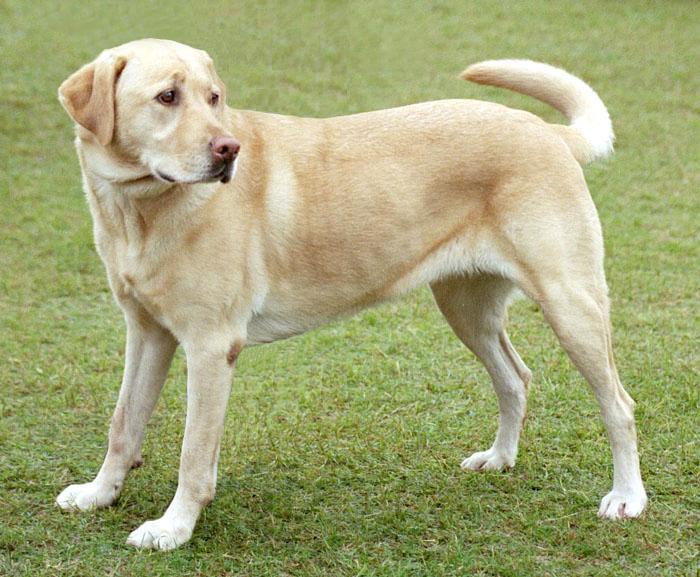
bird_song.txt (texto)
The sleek red sports car accelerated down the coastal road, its powerful engine a symphony of finely tuned machinery. It hugged every curve effortlessly, a blur of speed against the deep blue sea.dog_picture.jpg (imagen)

<IPython.core.display.HTML object>Consulta: “un gato esponjoso descansando”
dog_picture.jpg (imagen)
cat_image.png (imagen)
bird_song.txt (texto)
The sleek red sports car accelerated down the coastal road, its powerful engine a symphony of finely tuned machinery. It hugged every curve effortlessly, a blur of speed against the deep blue sea.<IPython.core.display.HTML object>Consulta: “hermoso paisaje de montaña”
ocean_view.jpg (imagen)
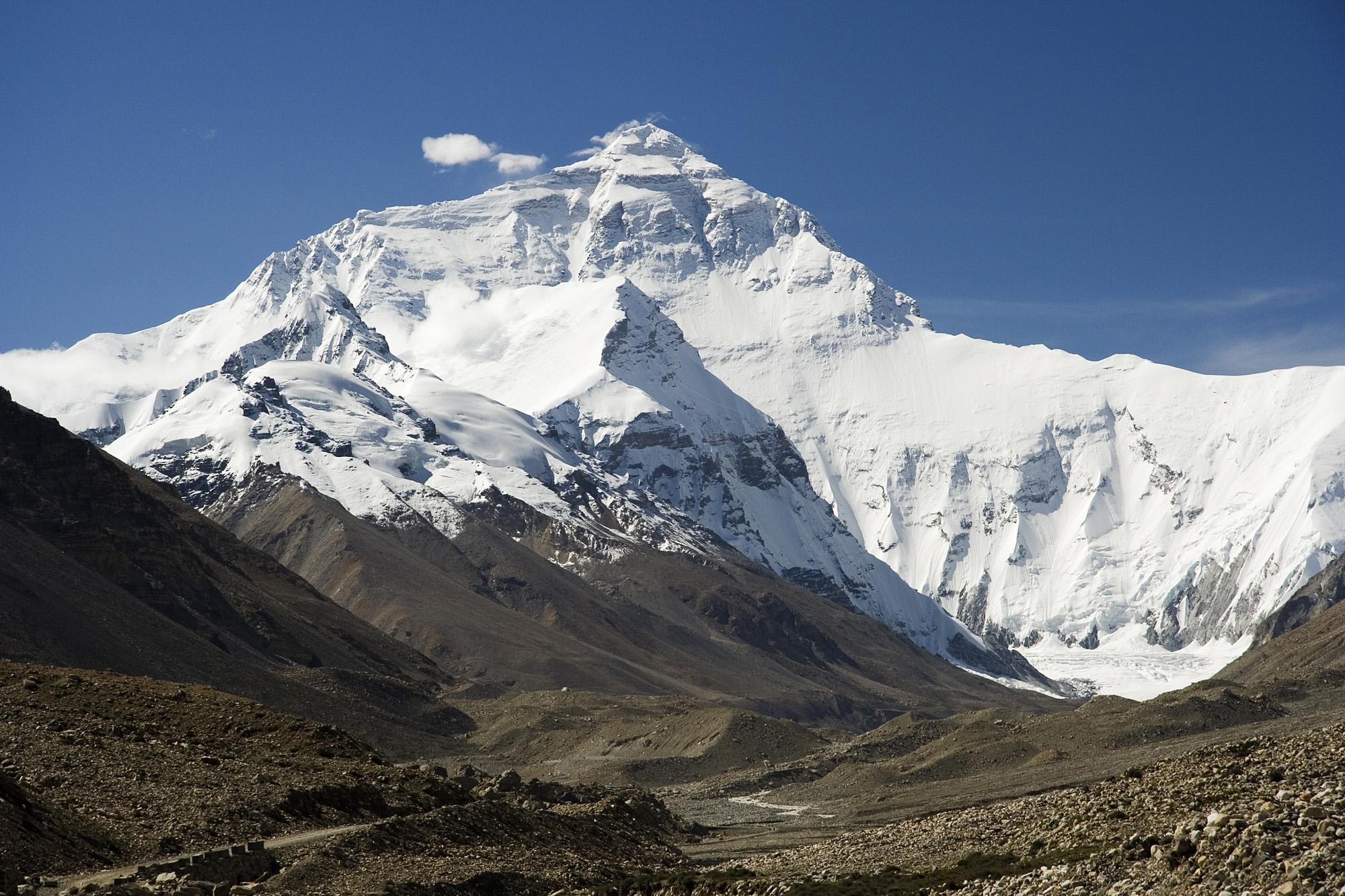
mountain_climbing.txt (texto)
The night sky is filled with billions of stars, planets, and galaxies. On a clear night, away from city lights, you can observe the Milky Way arching across the sky. Constellations like Orion and the ...bird_song.txt (texto)
The sleek red sports car accelerated down the coastal road, its powerful engine a symphony of finely tuned machinery. It hugged every curve effortlessly, a blur of speed against the deep blue sea.<IPython.core.display.HTML object>Consulta: “un cielo nocturno estrellado”
mountain_climbing.txt (texto)
The night sky is filled with billions of stars, planets, and galaxies. On a clear night, away from city lights, you can observe the Milky Way arching across the sky. Constellations like Orion and the ...space_facts.txt (texto)
The ocean covers more than 70% of the Earth's surface. It is home to a vast diversity of marine life, from microscopic plankton to giant whales. The deepest point, the Mariana Trench, plunges nearly 1...bird_song.txt (texto)
The sleek red sports car accelerated down the coastal road, its powerful engine a symphony of finely tuned machinery. It hugged every curve effortlessly, a blur of speed against the deep blue sea.<IPython.core.display.HTML object>Consulta: “el vasto océano y la vida marina”
space_facts.txt (texto)
The ocean covers more than 70% of the Earth's surface. It is home to a vast diversity of marine life, from microscopic plankton to giant whales. The deepest point, the Mariana Trench, plunges nearly 1...mountain_climbing.txt (texto)
The night sky is filled with billions of stars, planets, and galaxies. On a clear night, away from city lights, you can observe the Milky Way arching across the sky. Constellations like Orion and the ...bird_song.txt (texto)
The sleek red sports car accelerated down the coastal road, its powerful engine a symphony of finely tuned machinery. It hugged every curve effortlessly, a blur of speed against the deep blue sea.<IPython.core.display.HTML object>Consulta: “un coche deportivo rápido”
bird_song.txt (texto)
The sleek red sports car accelerated down the coastal road, its powerful engine a symphony of finely tuned machinery. It hugged every curve effortlessly, a blur of speed against the deep blue sea.cat_image.png (imagen)
mountain_climbing.txt (texto)
The night sky is filled with billions of stars, planets, and galaxies. On a clear night, away from city lights, you can observe the Milky Way arching across the sky. Constellations like Orion and the ...Búsqueda por palabras clave vs. búsqueda semántica
La tabla a continuación compara lo que cada enfoque devuelve cuando buscas el mismo término.
def keyword_search(query: str, corpus: list[dict[str, Any]]) -> list[str]:
    """Returns filenames that contain the query string (case-insensitive)."""
    query_lower = query.lower()
    return [
        item["filename"]
        for item in corpus
        if query_lower in item["filename"].lower()
    ]


# Compare keyword vs. semantic search for a few representative terms.
comparison_queries = [
    ("a fluffy cat resting", "cat"),
    ("a dog running in a field", "dog"),
    ("beautiful mountain scenery", "mountain"),
    ("the vast ocean and marine life", "ocean"),
    ("a starry night sky", "space"),
    ("a fast sports car", "bird")
]

header = f"{'Descriptive Query':<32}  {'Keyword matches':<22}  {'Top semantic match (score)'}"
print(header)
print("-" * len(header))

for desc_q, kw_term in comparison_queries:
    kw_hits = keyword_search(kw_term, indexed_corpus) or ["(none)"]
    sem_results = search_similar_content(desc_q, indexed_corpus, top_k=1)
    sem_top = f"{sem_results[0]['filename']} ({sem_results[0]['score']:.4f})" if sem_results else "(none)"
    print(f"{desc_q:<32}  {', '.join(kw_hits):<22}  {sem_top}")
Descriptive Query Keyword matches Top semantic match (score)
------------------------------------------------------------------------------------
a fluffy cat resting cat_image.png dog_picture.jpg (0.6800)
a dog running in a field dog_picture.jpg cat_image.png (0.6710)
beautiful mountain scenery mountain_climbing.txt ocean_view.jpg (0.6784)
the vast ocean and marine life ocean_view.jpg space_facts.txt (0.7908)
a starry night sky space_facts.txt mountain_climbing.txt (0.7686)
a fast sports car bird_song.txt bird_song.txt (0.7794)Resumen
En este notebook:
- Inicializaste el SDK
google-genaiy configuraste el modelo de embedding multimodalgemini-embedding-2. - Construiste un conjunto de datos mixto de imágenes y archivos de texto con nombres de archivo intencionalmente engañosos.
- Generaste embeddings para cada archivo y los almacenaste en un corpus en memoria.
- Consultaste el corpus con lenguaje natural y recuperaste resultados semánticamente relevantes, incluyendo imágenes, que la búsqueda por palabras clave habría omitido.
- Comparaste la búsqueda por palabras clave con la búsqueda semántica lado a lado para ilustrar la diferencia.
La idea central es que gemini-embedding-2 mapea texto e imágenes en un espacio vectorial compartido, por lo que una consulta de texto como "perro" puede mostrar una imagen de un perro guardada como cat_image.png, basándose puramente en el significado del contenido en lugar del nombre del archivo.
Aplicaciones en el mundo real
- Búsqueda de imágenes por descripción — recupera imágenes usando lenguaje natural, incluso sin etiquetas descriptivas.
- Recuperación de documentos entre modos — encuentra documentos de texto consultando con una imagen, o viceversa.
- Gestión de activos digitales — organiza y busca grandes bibliotecas de medios mixtos de manera eficiente.
- Sistemas de recomendación — muestra contenido semánticamente relacionado en diferentes tipos de medios.
Próximos pasos
Referencias útiles de la API
- Documentación del modelo
gemini-embedding-2 - Referencia de la API
client.models.embed_content - Tipos de tareas de embedding