Solicitudes asíncronas con la API de Gemini
Copyright 2026 Google LLC.
# @title Licensed under the Apache License, Version 2.0 (the "License");
# you may not use this file except in compliance with the License.
# You may obtain a copy of the License at
#
# https://www.apache.org/licenses/LICENSE-2.0
#
# Unless required by applicable law or agreed to in writing, software
# distributed under the License is distributed on an "AS IS" BASIS,
# WITHOUT WARRANTIES OR CONDITIONS OF ANY KIND, either express or implied.
# See the License for the specific language governing permissions and
# limitations under the License.
Este notebook te mostrará cómo hacer solicitudes asíncronas y paralelas usando el SDK de Python de la API de Gemini y la librería estándar asyncio de Python 3.
Los ejemplos aquí se ejecutan en Google Colab y usan el bucle de eventos implícito que Colab proporciona. También puedes ejecutar estos comandos de forma interactiva usando el REPL asyncio (invocado con python -m asyncio), o puedes gestionar el bucle de eventos tú mismo.
Nota: Este notebook usa la API de Interacciones, la forma más reciente de interactuar con los modelos Gemini. ¿Buscas la versión
generateContent? Revisa la rama de archivo.
%pip install -U -q "google-genai>=2.9.0" aiohttp # 2.0 for Interactions APINote: you may need to restart the kernel to use updated packages.Configura tu clave de API
Para ejecutar la siguiente celda, tu clave de API debe estar almacenada en un Secreto de Colab llamado GEMINI_API_KEY. Si aún no tienes una clave de API, o no estás seguro de cómo crear un Secreto de Colab, consulta Autenticación para ver un tutorial.
from google.colab import userdata
from google import genai

GEMINI_API_KEY = userdata.get("GEMINI_API_KEY")
client = genai.Client(api_key=GEMINI_API_KEY)
Selecciona el modelo que quieres usar en esta guía:
MODEL_ID = "gemini-3.7-flash" # @param ["gemini-3.1-pro-preview", "gemini-3.7-flash", "gemini-3.5-flash-lite", "gemini-2.5-pro"] {"allow-input":true, isTemplate: true}Uso de archivos locales
Este ejemplo sencillo muestra cómo puedes usar archivos locales (que se presume que cargan rápidamente) con la API async del SDK.
prompt = "Describe this image in just 3 words."

img_filenames = ["firefighter.jpg", "elephants.jpeg", "jetpack.jpg"]
img_dir = "https://storage.googleapis.com/generativeai-downloads/images/"
Empieza descargando los archivos localmente.
!wget -nv {img_dir}{{{','.join(img_filenames)}}}2026-06-22 11:49:41 URL:https://storage.googleapis.com/generativeai-downloads/images/firefighter.jpg [547369/547369] -> "firefighter.jpg" [1]2026-06-22 11:49:41 URL:https://storage.googleapis.com/generativeai-downloads/images/elephants.jpeg [224007/224007] -> "elephants.jpeg" [1]2026-06-22 11:49:41 URL:https://storage.googleapis.com/generativeai-downloads/images/jetpack.jpg [357568/357568] -> "jetpack.jpg" [1]
FINISHED --2026-06-22 11:49:41--
Total wall clock time: 0.6s
Downloaded: 3 files, 1.1M in 0.02s (59.4 MB/s)import PIL.Image
from IPython.display import display
for img_filename in img_filenames:
print(img_filename)
display(PIL.Image.open(img_filename).resize((300, 200)))firefighter.jpg<PIL.Image.Image image mode=RGB size=300x200>
elephants.jpeg<PIL.Image.Image image mode=RGB size=300x200>
jetpack.jpg<PIL.Image.Image image mode=RGB size=300x200>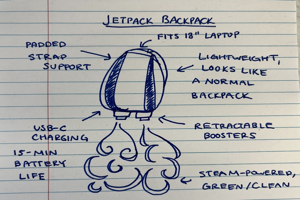
El código asíncrono usa el método aio.interactions.create para invocar la API. La mayoría de los métodos de API asíncronos se pueden encontrar en el espacio de nombres aio.
Ten en cuenta que este código no se ejecuta en paralelo. La llamada asíncrona indica que el bucle de eventos puede ceder a otras tareas, pero no hay otras tareas programadas en este código. Esto puede ser suficiente, por ejemplo, si lo estás ejecutando en un controlador de solicitudes de un servidor web, ya que permitirá que el controlador ceda a otras tareas mientras espera la respuesta de la API.
import PIL
import base64
from io import BytesIO

async def describe_local_images():

  for img_filename in img_filenames:

    # Convert image to base64 for the API
    img = PIL.Image.open(img_filename)
    buffered = BytesIO()
    img.save(buffered, format="JPEG")
    img_b64 = base64.b64encode(buffered.getvalue()).decode("utf-8")

    interaction = await client.aio.interactions.create(
        model=MODEL_ID,
        input=[
            {"type": "image", "data": img_b64, "mime_type": "image/jpeg"},
            {"type": "text", "text": prompt},
        ],
    )
    print(interaction.steps[-1].content[0].text)


await describe_local_images()
/usr/local/google/home/giom/nb-fixes/venv/lib/python3.13/site-packages/IPython/core/interactiveshell.py:3746: UserWarning: Async interactions client cannot use aiohttp, fallingback to httpx.
await eval(code_obj, self.user_global_ns, self.user_ns)Cat in tree.Wild elephant familyJetpack backpack sketchDescarga de imágenes de forma asíncrona y en paralelo
Este ejemplo muestra un caso más real donde una imagen se descarga de una fuente externa usando la librería HTTP asíncrona aiohttp, y cada imagen se procesa en paralelo.
import io, aiohttp, asyncio

async def download_image(session: aiohttp.ClientSession, img_url: str) -> bytes:
  """Returns base64-encoded image data from the provided URL."""
  async with session.get(img_url) as img_resp:
    data = await img_resp.read()
    return base64.b64encode(data).decode("utf-8")


async def process_image(img_future: asyncio.Future) -> str:
  """Summarise the image using the Interactions API."""
  img_b64 = await img_future
  interaction = await client.aio.interactions.create(
      model=MODEL_ID,
      input=[
          {"type": "image", "data": img_b64, "mime_type": "image/jpeg"},
          {"type": "text", "text": prompt},
      ],
  )
  return interaction.steps[-1].content[0].text
async def download_and_describe():
async with aiohttp.ClientSession() as sesh:
response_futures = []
for img_filename in img_filenames:
# Create the image download tasks (this does not schedule them yet).
img_future = download_image(sesh, img_dir + img_filename)
# Kick off the Gemini API request using the pending image download tasks.
text_future = process_image(img_future)
# Save the reference so they can be processed as they complete.
response_futures.append(text_future)
print(f"Download and content generation queued for {len(response_futures)} images.")
# Process responses as they complete (may be a different order). The tasks are started here.
for response in asyncio.as_completed(response_futures):
print()
print(await response)
await download_and_describe()Download and content generation queued for 3 images.Jetpack backpack sketchWild elephant family
Firefighter rescues catEn el ejemplo anterior, se crea una corrutina para cada imagen que descarga y luego resume la imagen. Las corrutinas se ejecutan en el paso final, en el bucle as_completed. Para iniciarlas lo antes posible sin bloquear el otro trabajo, podrías envolver download_image en asyncio.ensure_future, pero para este ejemplo la ejecución se ha pospuesto para mantener separadas las preocupaciones de creación y ejecución.
Próximos pasos
- Consulta la clase
AsyncClienten la referencia del SDK de Python. - Lee más sobre la librería
asynciode Python.